> ## Documentation Index
> Fetch the complete documentation index at: https://www.propeldata.com/llms.txt
> Use this file to discover all available pages before exploring further.

# Changing schemas

> Schema changes in ClickHouse.

<div />

Propel offers easy-to-use APIs to safely perform non-breaking schema changes. You can add columns to your Data Pool using the API or Console.

For column deletions, modifications, and data type changes you need to create a new Data Pool and copy the data over.

## Adding a column to a Data Pool

Propel provides an “Add column” operation that safely adds a column to a Data Pool.

<Tabs>
  <Tab title="Console">
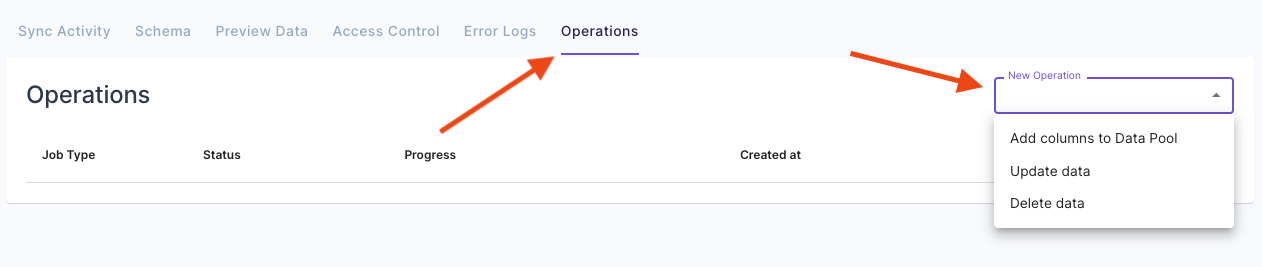
    To add a column to a Data Pool, go to the **"Operations"** tab and select **"Add column to Data Pool"**.

    <Frame>
      <img src="https://mintcdn.com/propeldocs/G8bGSg66eBpnYaHB/images/docs/2024-08-01-data-pool-operations.png?fit=max&auto=format&n=G8bGSg66eBpnYaHB&q=85&s=d0a4a23ff2640008c925c6350afdd0d1" alt="Data Pool Operations" width="1262" height="267" data-path="images/docs/2024-08-01-data-pool-operations.png" />
    </Frame>

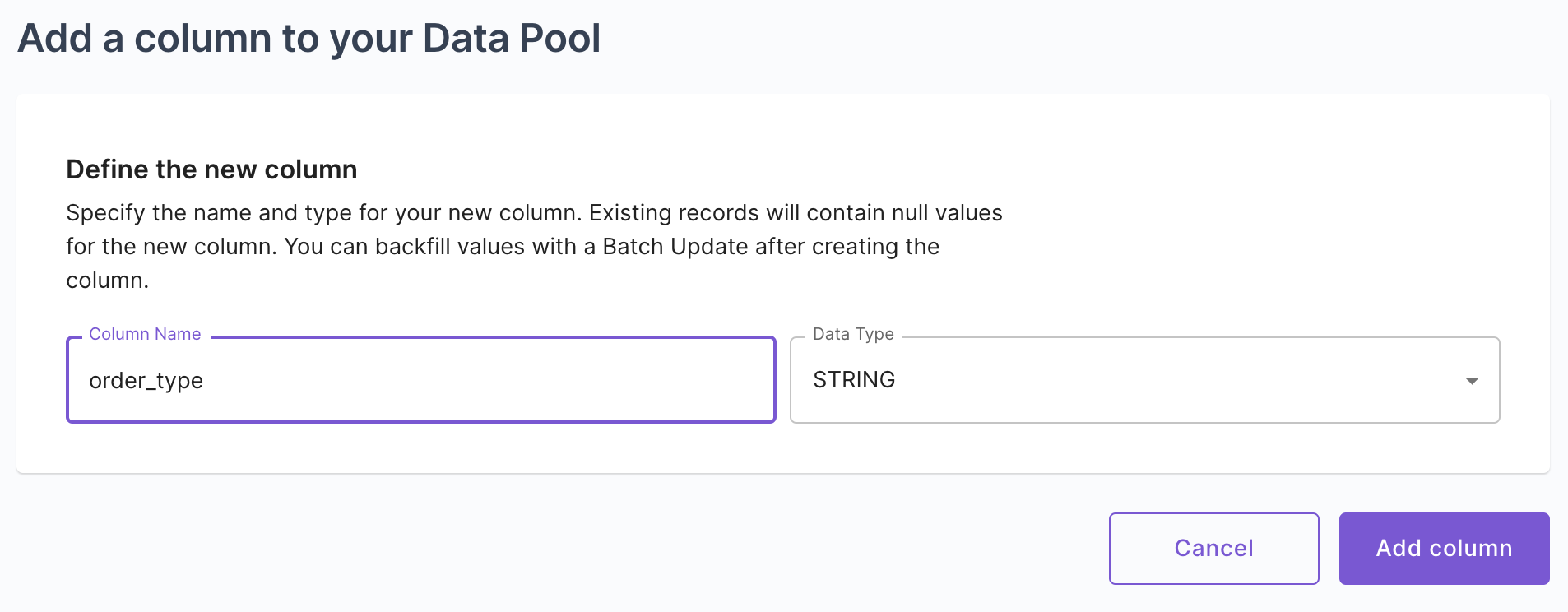
    Then, you can specify the column to add by giving it a name and a data type.
    <Frame>
      <img src="https://mintcdn.com/propeldocs/G8bGSg66eBpnYaHB/images/docs/2024-08-01-data-pool-add-column.png?fit=max&auto=format&n=G8bGSg66eBpnYaHB&q=85&s=78828d28ae71b2277758d4f225e7beb1" alt="Add column to Data Pool" width="1906" height="744" data-path="images/docs/2024-08-01-data-pool-add-column.png" />
    </Frame>

    Clicking **"Add column"** starts an asynchronous operation to add the column to the Data Pool.

  </Tab>

  <Tab title="API">
    You can add a column to a Data Pool with the [`createAddColumnToDataPoolJob`](/docs/management-api/mutations#createaddcolumntodatapooljob) API.

    ```graphql showLineNumbers theme={"system"}
    mutation {
      createAddColumnToDataPoolJob(input: {
        dataPool: "DPOXXXXXXXXXXX"
        columnName: "new_column"
        columnType: STRING
      }) {
        job {
          id
          status
          progress
          error {
            message
          }
        }
      }
    }
    ```
  </Tab>
</Tabs>

***

The duration of this process depends on the size of the Data Pool.

Whether the job is created via the Console or API, you can monitor the progress on the Data Pool's **"Operations"** tab.

<Frame>
  <img src="https://mintcdn.com/propeldocs/G8bGSg66eBpnYaHB/images/docs/2024-08-01-data-pool-add-column-progress.png?fit=max&auto=format&n=G8bGSg66eBpnYaHB&q=85&s=1323c5a4ffb032f465cfaf41d497156b" alt="Add column to Data Pool progress" width="1782" height="344" data-path="images/docs/2024-08-01-data-pool-add-column-progress.png" />
</Frame>

Note that when you add a column, Propel will not backfill. To backfill existing rows, you can run a [batch update operation](/docs/updating-data#batch-updates).
