> ## Documentation Index
> Fetch the complete documentation index at: https://www.propeldata.com/llms.txt
> Use this file to discover all available pages before exploring further.
# Creating tables
> Create Data Pools via the API or Terraform.
Propel Data Pools are ClickHouse tables with a pipeline to [ingest](/docs/ingestion) data from a data source. With the API, you can create an empty Data Pool that creates table in Propel's Serverless ClickHouse.
See the [Create Data Pool API reference documentation](/docs/management-api/mutations#createdatapoolv2).
## API Arguments
The table below describes the input parameters for the [`createDataPoolV2`](/docs/management-api/mutations#createdatapoolv2) API.
| Argument | Description | Required |
| ---------------------- | ----------------------------------------------------------------------------------------------------------------------------------------------------------------------------------------------------------- | -------- |
| `uniqueName` | The Data Pool's unique name. If not specified, Propel will set the ID as the unique name. | No |
| `description` | The Data Pool's description. | No |
| `timestamp` | The table's default timestamp column. Used as the default timestamp for the Query APIs. | No |
| `columns` | The list of column names and their types. | Yes |
| `accessControlEnabled` | Enables or disables access control for the Data Pool. If the Data Pool has access control enabled, Applications must be assigned Data Pool Access Policies in order to query the Data Pool and its Metrics. | No |
| `tableSettingsInput` | The [`tableSettingsInput`](/docs/management-api/inputs#tablesettingsinput) object define how the Data Pool's table is created in ClickHouse. See table settings below. | No |
### Table settings
The table settings define how the table is created in ClickHouse. To learn more about table engines, read our guide on [How to select a table engine and sorting key](/docs/guides/table-engine-and-sorting-key).
## Creating tables with TTL
You can configure Time-To-Live (TTL) settings for your Data Pool to automatically manage data lifecycle. TTL allows you to:
* Delete old data after a specified time interval
* Roll up aging data into aggregations before deletion
### TTL syntax
```
TTL expr
[DELETE][, expr DELETE] ...
[WHERE conditions]
[GROUP BY key_expr [SET v1 = aggr_func(v1) [, v2 = aggr_func(v2) ...]] ]
```
### Example TTL expressions
A table that deletes data after 12 months:
```
toDateTime(created_at) + INTERVAL 12 MONTH DELETE
```
A table that deletes data after 12 months where event type is `error`:
```
toDateTime(created_at) + INTERVAL 12 MONTH DELETE WHERE event_type = 'error'
```
A table that deletes data after 12 months and rolls up data into a count and sum aggregations:
```
toDateTime(created_at) + INTERVAL 12 MONTH DELETE, toDateTime(created_at) + INTERVAL 12 MONTH GROUP BY toStartOfDay(created_at) SET event_count = count(*), sum_quantity = sum(quantity)
```
Some notes on the TTL expression:
* The TTL clause must be a prefix of the primary key. Therefore, you need to add `toStartOfDay(created_at)` to the sorting key.
* Your Data Pool needs to have the columns `event_count` and `sum_quantity` to store the aggregated results.
* You need to set the following default column values for the aggregations to work:
* `event_count` to `1`
* `sum_quantity` to `quantity`
See the [example](#example-2-a-table-that-deletes-data-after-12-months) on how to create a table with TTL in the Console and API.
## Examples
### Example 1: Create a MergeTree table
This example shows how to create a Data Pool using the API and Terraform.
```graphql theme={"system"}
mutation {
createDataPoolV2(
input: {
uniqueName: "New TacoSoft Demo Data"
description: "A sample dataset consisting of orders for a taco ordering SaaS"
timestamp: { columnName: "timestamp" }
columns: [
{ columnName: "quantity", type: INT32, isNullable: false },
{ columnName: "taco_name", type: STRING, isNullable: false },
{ columnName: "sauce_name", type: STRING, isNullable: false },
{ columnName: "restaurant_id", type: STRING, isNullable: false },
{ columnName: "restaurant_name", type: STRING, isNullable: false },
{ columnName: "taco_total_price", type: FLOAT, isNullable: false },
{ columnName: "order_item_id", type: STRING, isNullable: false },
{ columnName: "tortilla_id", type: STRING, isNullable: false },
{ columnName: "toppings", type: JSON, isNullable: false },
{ columnName: "sauce_id", type: STRING, isNullable: false },
{ columnName: "taco_unit_price", type: FLOAT, isNullable: false },
{ columnName: "order_id", type: STRING, isNullable: false },
{ columnName: "order_item_generated_at", type: TIMESTAMP, isNullable: false },
{ columnName: "taco_id", type: STRING, isNullable: false },
{ columnName: "timestamp", type: TIMESTAMP, isNullable: false },
{ columnName: "tortilla_name", type: STRING, isNullable: false }
]
accessControlEnabled: true
tableSettings: {
engine: {
mergeTree: {
type: MERGE_TREE
}
}
orderBy: ["timestamp"]
}
}
) {
dataPool {
id
uniqueName
accessControlEnabled
description
tableSettings {
orderBy
}
}
}
}
```
```hcl theme={"system"}
resource "propel_data_pool" "tacosoft_demo_data" {
unique_name = "New TacoSoft Demo Data"
description = "A sample dataset consisting of orders for a taco ordering SaaS"
timestamp = "created_at"
access_control_enabled = true
table_settings {
engine {
type = "MERGE_TREE"
}
order_by = ["timestamp"]
}
column {
name = "quantity"
type = "INT32"
nullable = false
}
column {
name = "taco_name"
type = "STRING"
nullable = false
}
column {
name = "sauce_name"
type = "STRING"
nullable = false
}
column {
name = "restaurant_id"
type = "STRING"
nullable = false
}
column {
name = "restaurant_name"
type = "STRING"
nullable = false
}
column {
name = "taco_total_price"
type = "FLOAT"
nullable = false
}
column {
name = "order_item_id"
type = "STRING"
nullable = false
}
column {
name = "tortilla_id"
type = "STRING"
nullable = false
}
column {
name = "toppings"
type = "JSON"
nullable = false
}
column {
name = "sauce_id"
type = "STRING"
nullable = false
}
column {
name = "taco_unit_price"
type = "FLOAT"
nullable = false
}
column {
name = "order_id"
type = "STRING"
nullable = false
}
column {
name = "order_item_generated_at"
type = "TIMESTAMP"
nullable = false
}
column {
name = "taco_id"
type = "STRING"
nullable = false
}
column {
name = "timestamp"
type = "TIMESTAMP"
nullable = false
}
column {
name = "tortilla_name"
type = "STRING"
nullable = false
}
}
```
***
### Example 2: A table that deletes data after 12 months
In the **"Table settings"** step of the Data Pool creation wizard, click **"Advanced"**, and you can set the TTL for your Data Pool.
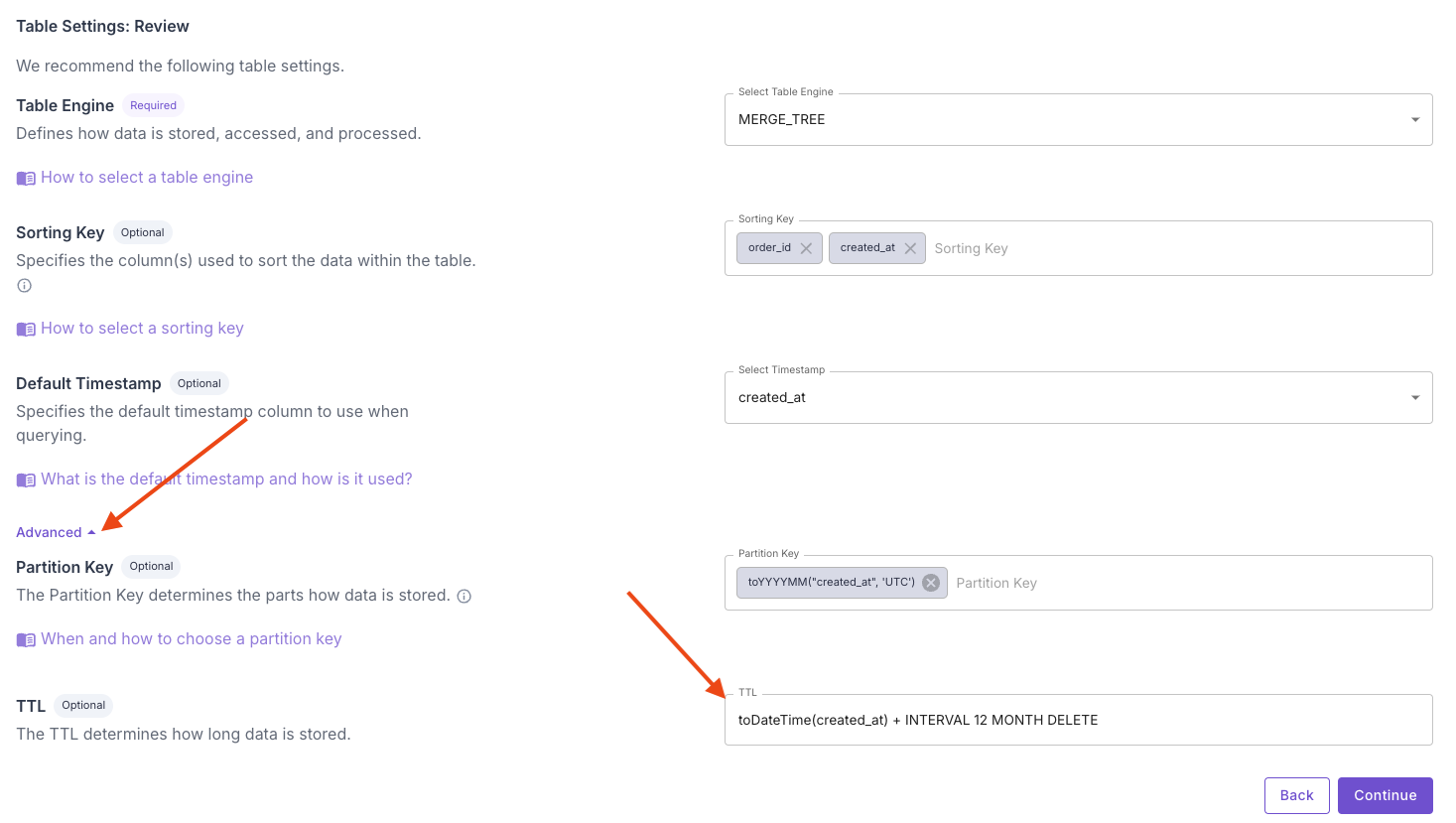 When creating a Data Pool, you can specify the `ttl` setting in the `tableSettings` input.
```json theme={"system"}
...
"tableSettings": {
...
"ttl": "toDateTime(created_at) + INTERVAL 12 MONTH DELETE"
}
...
```
When creating a Data Pool, you can specify the `ttl` setting in the `tableSettings` input.
```json theme={"system"}
...
"tableSettings": {
...
"ttl": "toDateTime(created_at) + INTERVAL 12 MONTH DELETE"
}
...
```