> ## Documentation Index
> Fetch the complete documentation index at: https://www.propeldata.com/llms.txt
> Use this file to discover all available pages before exploring further.
# Deleting data
> Real-time and batch deletes in ClickHouse.
Propel offers both [real-time](#real-time-deletes) and [batch](#batch-deletes) delete capabilities.
## Real-time deletes
Real-time deletes allow you to delete existing rows in a table, which are immediately excluded when querying.
### Use cases
* Delete rows in a table and immediately exclude them from queries
* Delete entities (users, accounts, etc.) or dimensions
### How it works
Real-time deletes in Propel are supported by ClickHouse's ReplacingMergeTree table engine. Deletes do not happen transactionally. Instead, they happen asynchronously, where Propel uses a combination of filter-on-read and background jobs to perform the deletes.
When a row is deleted, a new record is written with an internal `_propel_is_deleted` column set to `true`. Propel deletes these records in the background, asynchronously. To ensure that deleted data is never returned in queries, Propel automatically performs a filter-on-read when querying ReplacingMergeTree tables. This ensures that no deleted record is returned, even if the background delete operation has not yet occurred.
However, it's important to note that there are two implications:
1. The row count in ReplacingMergeTree tables may be larger than the logical number of rows. This is because there may be duplicate rows in the table that haven't been deleted yet. These rows will be de-duplicated at query time.
2. Filtering deleted records at query time has performance implications on read operations. This can be compensated using a larger Propeller.
### Create a Data Pool to handle real-time deletes
In this section, we will guide you through the process of creating a Data Pool that can handle real-time deletes. We will provide step-by-step instructions on how to create it via the Console, API, and Terraform.
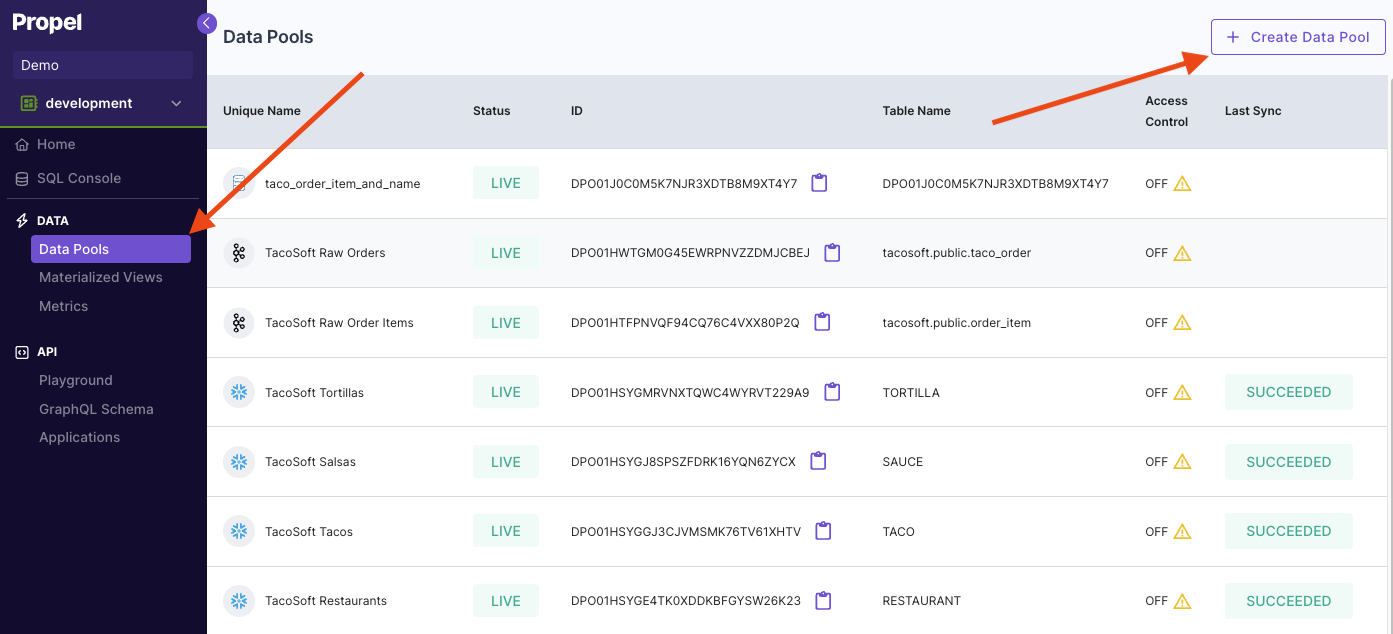
To create a Data Pool that can handle real-time deletes in Console, first go to the **"Data Pools"** section, then click **"Create Data Pool"**.
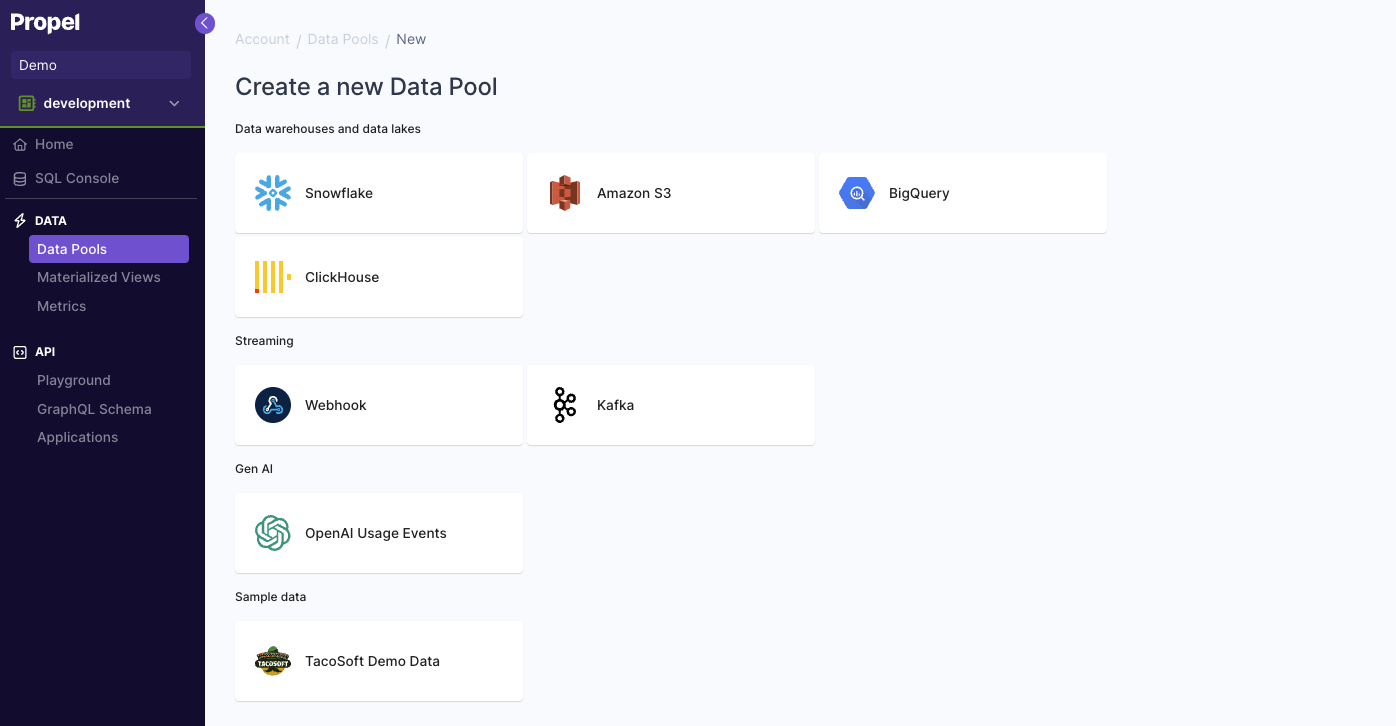
 Select the Data Pool type you need to create.
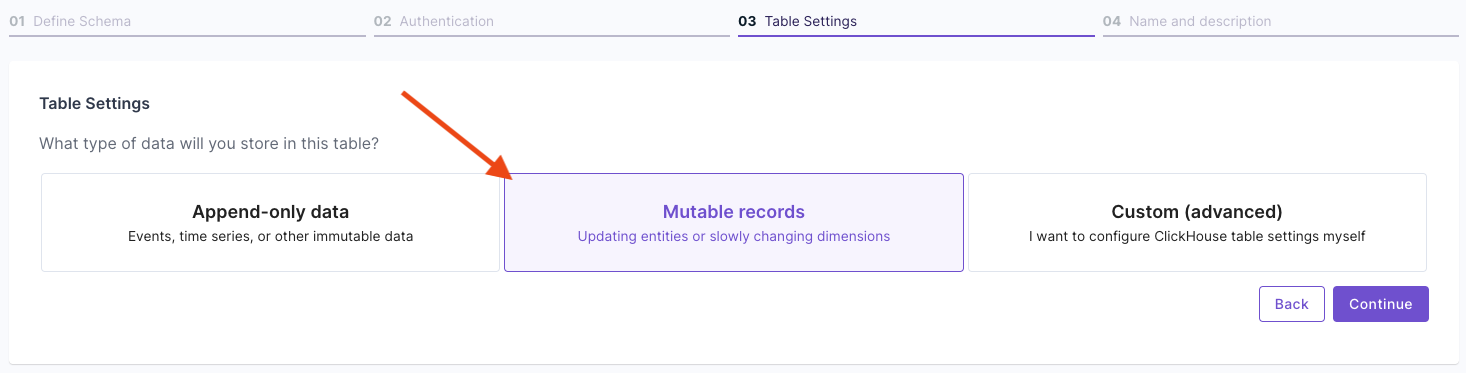
 In the **"Table Settings"** step, select **"Mutable Data"**.
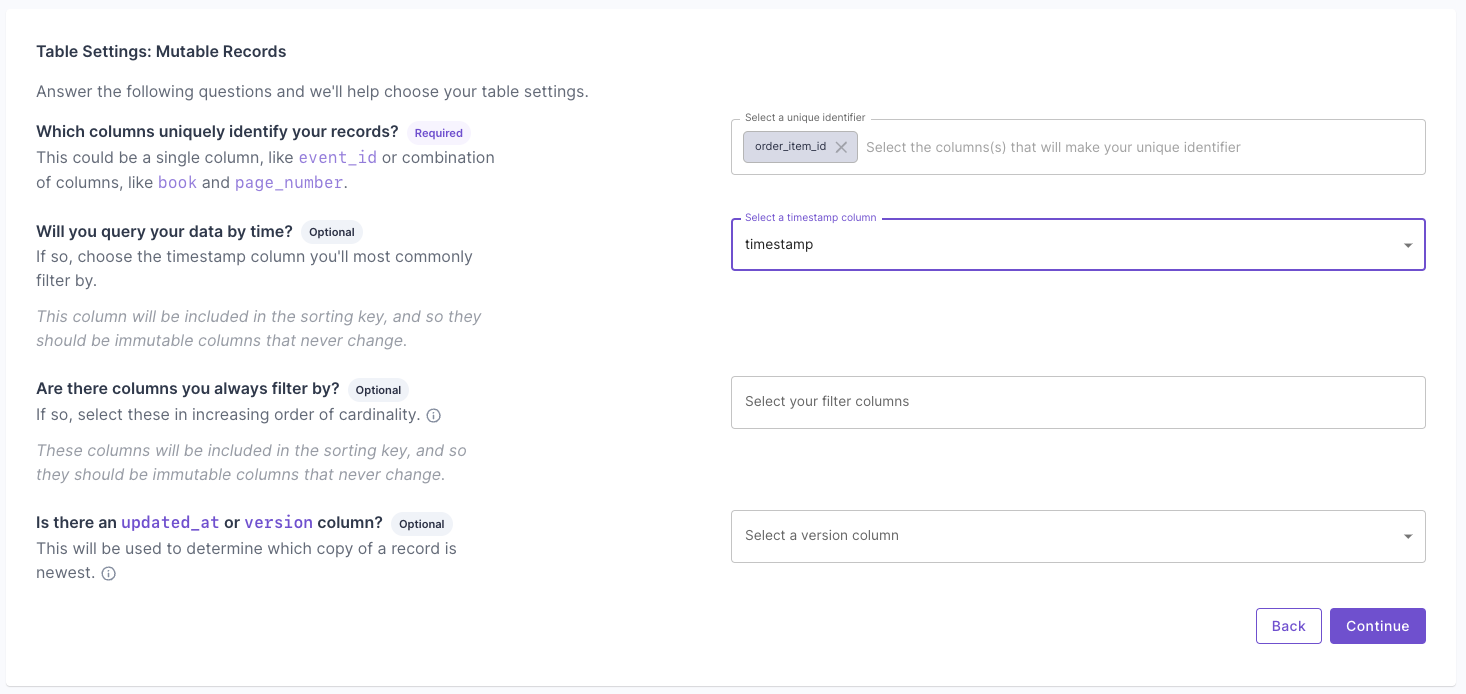
 Answer the questions on how to uniquely identify records and your query patterns. For more information, read the "Mutable records" section of the [How to select a table engine and sorting key](https://www.propeldata.com/docs/guides/table-engine-and-sorting-key#mutable-records) guide.
 Next, you will get the suggested table settings. Note that the table engine is ReplacingMergeTree, and the sorting key determines the uniqueness of the row.
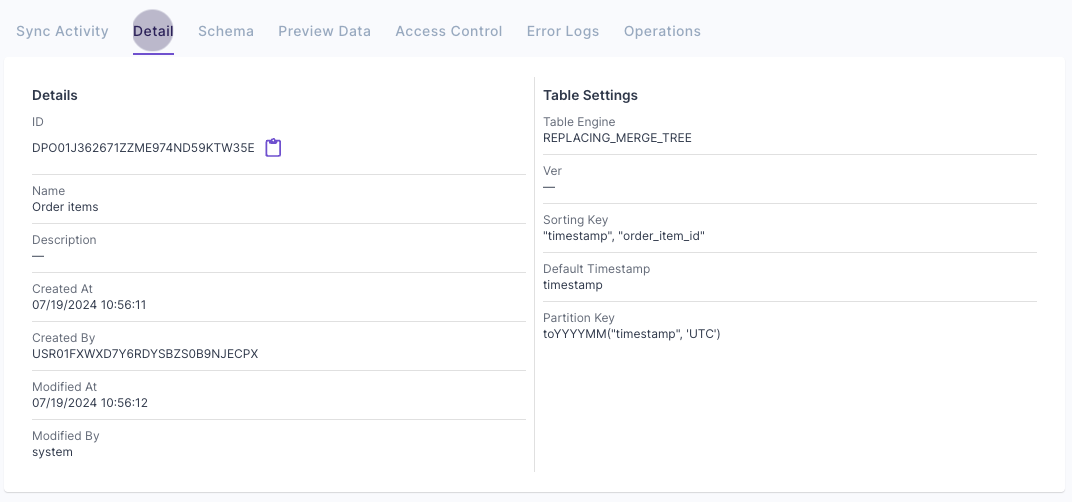
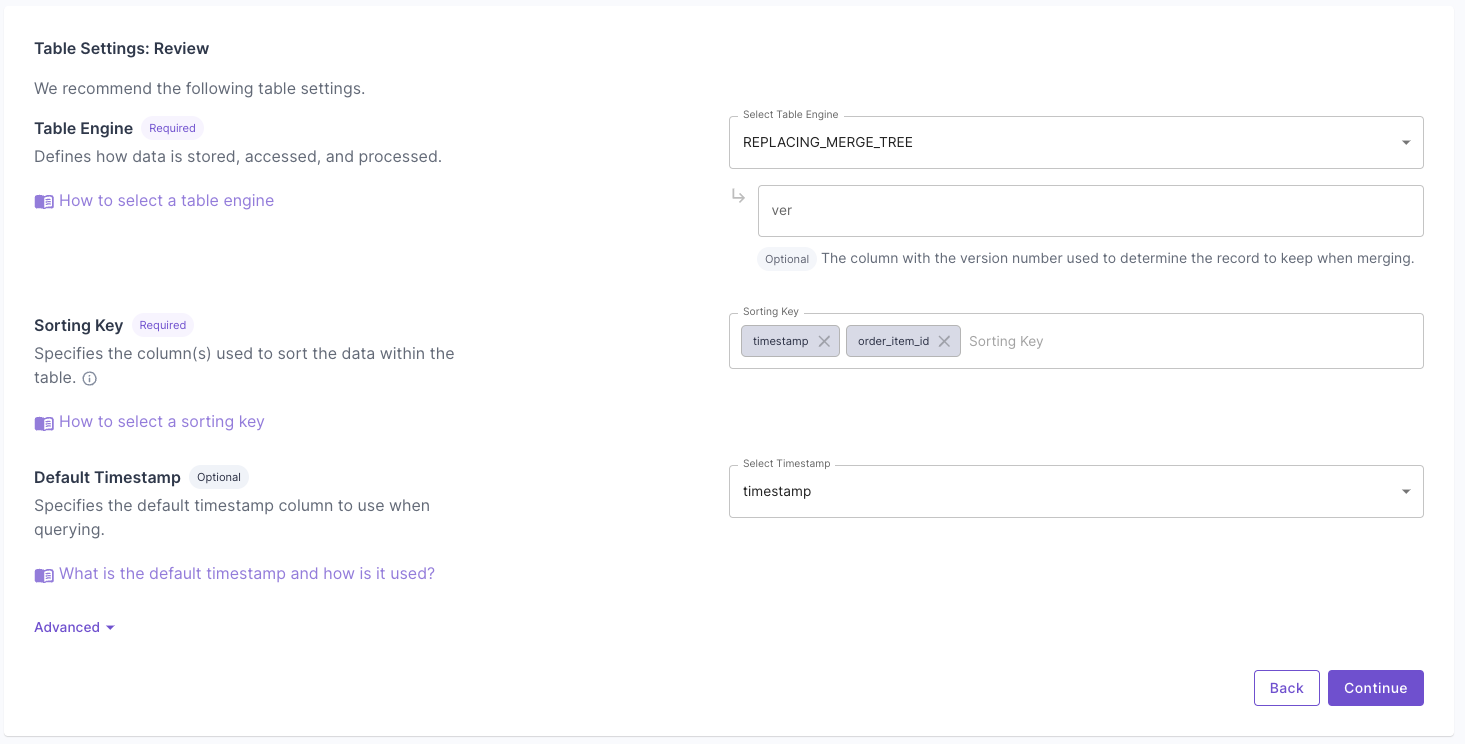 Click **"Next"** to finish setting up the Data Pool. Once it is created, you can go to the **"Details"** tab and verify the settings.
 The API request below creates a Data Pool that can handle real-time deletes. It uses the ReplacingMergeTree table engine, the timestamp, and order\_item\_id columns to sort and determine uniqueness.
```graphql theme={"system"}
mutation {
createDataPoolV2(input: {
uniqueName: "TacoSoft Order Items"
description: "Data Pool supporting real-time deletes for TacoSoft Order Items"
timestamp: {
columnName: "timestamp"
}
columns: [
{ columnName: "quantity", type: INT32, isNullable: false },
{ columnName: "taco_name", type: STRING, isNullable: false },
{ columnName: "sauce_name", type: STRING, isNullable: false },
{ columnName: "restaurant_id", type: STRING, isNullable: false },
{ columnName: "restaurant_name", type: STRING, isNullable: false },
{ columnName: "taco_total_price", type: FLOAT, isNullable: false },
{ columnName: "order_item_id", type: STRING, isNullable: false },
{ columnName: "tortilla_id", type: STRING, isNullable: false },
{ columnName: "toppings", type: JSON, isNullable: false },
{ columnName: "sauce_id", type: STRING, isNullable: false },
{ columnName: "taco_unit_price", type: FLOAT, isNullable: false },
{ columnName: "order_id", type: STRING, isNullable: false },
{ columnName: "order_item_generated_at", type: TIMESTAMP, isNullable: false },
{ columnName: "taco_id", type: STRING, isNullable: false },
{ columnName: "timestamp", type: TIMESTAMP, isNullable: false },
{ columnName: "tortilla_name", type: STRING, isNullable: false }
],
tableSettings: {
engine: {
replacingMergeTree: {
type: REPLACING_MERGE_TREE
}
}
partitionBy: ["toYYYYMM(timestamp)"]
orderBy: ["timestamp", "order_item_id"]
}
}) {
dataPool {
id
uniqueName
description
tableSettings {
orderBy
partitionBy
}
}
}
}
```
The following Terraform creates a Data Pool that can handle real-time deletes. It uses the ReplacingMergeTree table engine, the timestamp, and order\_item\_id columns to sort and determine uniqueness.
```hcl theme={"system"}
resource "propel_data_pool" "updatable_tacosoft_order_items" {
unique_name = "TacoSoft Order Items"
description = "Data Pool supporting real-time deletes for TacoSoft Order Items"
timestamp = "timestamp"
table_settings {
engine {
type = "REPLACING_MERGE_TREE"
}
partition_by = ["toYYYYMM(timestamp)"]
order_by = ["timestamp", "order_item_id"]
}
column {
name = "quantity"
type = "INT32"
nullable = false
}
column {
name = "taco_name"
type = "STRING"
nullable = false
}
column {
name = "sauce_name"
type = "STRING"
nullable = false
}
column {
name = "restaurant_id"
type = "STRING"
nullable = false
}
column {
name = "restaurant_name"
type = "STRING"
nullable = false
}
column {
name = "taco_total_price"
type = "FLOAT"
nullable = false
}
column {
name = "order_item_id"
type = "STRING"
nullable = false
}
column {
name = "tortilla_id"
type = "STRING"
nullable = false
}
column {
name = "toppings"
type = "JSON"
nullable = false
}
column {
name = "sauce_id"
type = "STRING"
nullable = false
}
column {
name = "taco_unit_price"
type = "FLOAT"
nullable = false
}
column {
name = "order_id"
type = "STRING"
nullable = false
}
column {
name = "order_item_generated_at"
type = "TIMESTAMP"
nullable = false
}
column {
name = "taco_id"
type = "STRING"
nullable = false
}
column {
name = "timestamp"
type = "TIMESTAMP"
nullable = false
}
column {
name = "tortilla_name"
type = "STRING"
nullable = false
}
}
```
***
## Batch deletes
Batch deletes are useful for one-off or automated jobs where you need to delete many rows in a table.
### Use cases
* Deletes for GDPR compliance
* One-off deletes of incorrect data
### How it works
Batch deletes in Propel are supported by table mutations in ClickHouse. When you perform a batch delete, Propel issues an `ALTER TABLE … DELETE` statement to ClickHouse and monitors its progress. The mutation proceeds part-by-part, partition-by-partition, deleting rows in the table.
Propel provides a simple way to data data asynchronously using the Console or the [`createDeletionJob`](/docs/management-api/mutations#createdeletionjob) API.
### Create a batch delete job
In this section, we guide you through the process of creating a batch delete job via the Console and API.
You can initiate a delete job in the Console by navigating to the Data Pool from which you need to delete data, clicking on the **"Operations"** tab, and then clicking **"Delete data"**.
The API request below creates a Data Pool that can handle real-time deletes. It uses the ReplacingMergeTree table engine, the timestamp, and order\_item\_id columns to sort and determine uniqueness.
```graphql theme={"system"}
mutation {
createDataPoolV2(input: {
uniqueName: "TacoSoft Order Items"
description: "Data Pool supporting real-time deletes for TacoSoft Order Items"
timestamp: {
columnName: "timestamp"
}
columns: [
{ columnName: "quantity", type: INT32, isNullable: false },
{ columnName: "taco_name", type: STRING, isNullable: false },
{ columnName: "sauce_name", type: STRING, isNullable: false },
{ columnName: "restaurant_id", type: STRING, isNullable: false },
{ columnName: "restaurant_name", type: STRING, isNullable: false },
{ columnName: "taco_total_price", type: FLOAT, isNullable: false },
{ columnName: "order_item_id", type: STRING, isNullable: false },
{ columnName: "tortilla_id", type: STRING, isNullable: false },
{ columnName: "toppings", type: JSON, isNullable: false },
{ columnName: "sauce_id", type: STRING, isNullable: false },
{ columnName: "taco_unit_price", type: FLOAT, isNullable: false },
{ columnName: "order_id", type: STRING, isNullable: false },
{ columnName: "order_item_generated_at", type: TIMESTAMP, isNullable: false },
{ columnName: "taco_id", type: STRING, isNullable: false },
{ columnName: "timestamp", type: TIMESTAMP, isNullable: false },
{ columnName: "tortilla_name", type: STRING, isNullable: false }
],
tableSettings: {
engine: {
replacingMergeTree: {
type: REPLACING_MERGE_TREE
}
}
partitionBy: ["toYYYYMM(timestamp)"]
orderBy: ["timestamp", "order_item_id"]
}
}) {
dataPool {
id
uniqueName
description
tableSettings {
orderBy
partitionBy
}
}
}
}
```
The following Terraform creates a Data Pool that can handle real-time deletes. It uses the ReplacingMergeTree table engine, the timestamp, and order\_item\_id columns to sort and determine uniqueness.
```hcl theme={"system"}
resource "propel_data_pool" "updatable_tacosoft_order_items" {
unique_name = "TacoSoft Order Items"
description = "Data Pool supporting real-time deletes for TacoSoft Order Items"
timestamp = "timestamp"
table_settings {
engine {
type = "REPLACING_MERGE_TREE"
}
partition_by = ["toYYYYMM(timestamp)"]
order_by = ["timestamp", "order_item_id"]
}
column {
name = "quantity"
type = "INT32"
nullable = false
}
column {
name = "taco_name"
type = "STRING"
nullable = false
}
column {
name = "sauce_name"
type = "STRING"
nullable = false
}
column {
name = "restaurant_id"
type = "STRING"
nullable = false
}
column {
name = "restaurant_name"
type = "STRING"
nullable = false
}
column {
name = "taco_total_price"
type = "FLOAT"
nullable = false
}
column {
name = "order_item_id"
type = "STRING"
nullable = false
}
column {
name = "tortilla_id"
type = "STRING"
nullable = false
}
column {
name = "toppings"
type = "JSON"
nullable = false
}
column {
name = "sauce_id"
type = "STRING"
nullable = false
}
column {
name = "taco_unit_price"
type = "FLOAT"
nullable = false
}
column {
name = "order_id"
type = "STRING"
nullable = false
}
column {
name = "order_item_generated_at"
type = "TIMESTAMP"
nullable = false
}
column {
name = "taco_id"
type = "STRING"
nullable = false
}
column {
name = "timestamp"
type = "TIMESTAMP"
nullable = false
}
column {
name = "tortilla_name"
type = "STRING"
nullable = false
}
}
```
***
## Batch deletes
Batch deletes are useful for one-off or automated jobs where you need to delete many rows in a table.
### Use cases
* Deletes for GDPR compliance
* One-off deletes of incorrect data
### How it works
Batch deletes in Propel are supported by table mutations in ClickHouse. When you perform a batch delete, Propel issues an `ALTER TABLE … DELETE` statement to ClickHouse and monitors its progress. The mutation proceeds part-by-part, partition-by-partition, deleting rows in the table.
Propel provides a simple way to data data asynchronously using the Console or the [`createDeletionJob`](/docs/management-api/mutations#createdeletionjob) API.
### Create a batch delete job
In this section, we guide you through the process of creating a batch delete job via the Console and API.
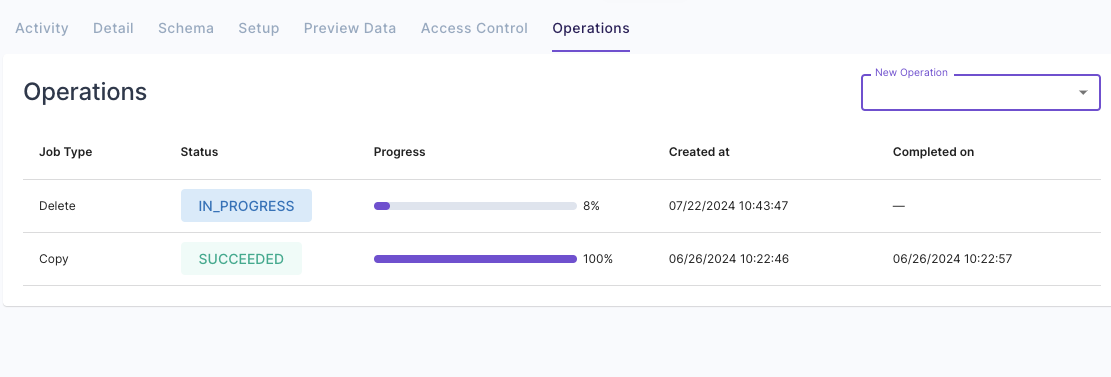
You can initiate a delete job in the Console by navigating to the Data Pool from which you need to delete data, clicking on the **"Operations"** tab, and then clicking **"Delete data"**.
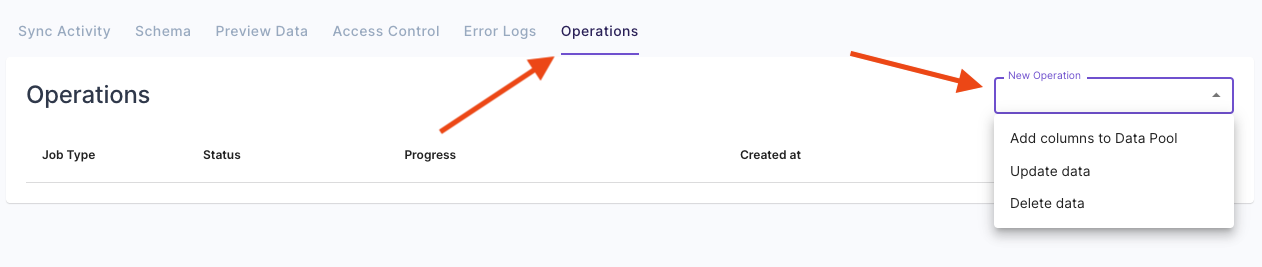 Here, you can specify the filters of the data to delete.
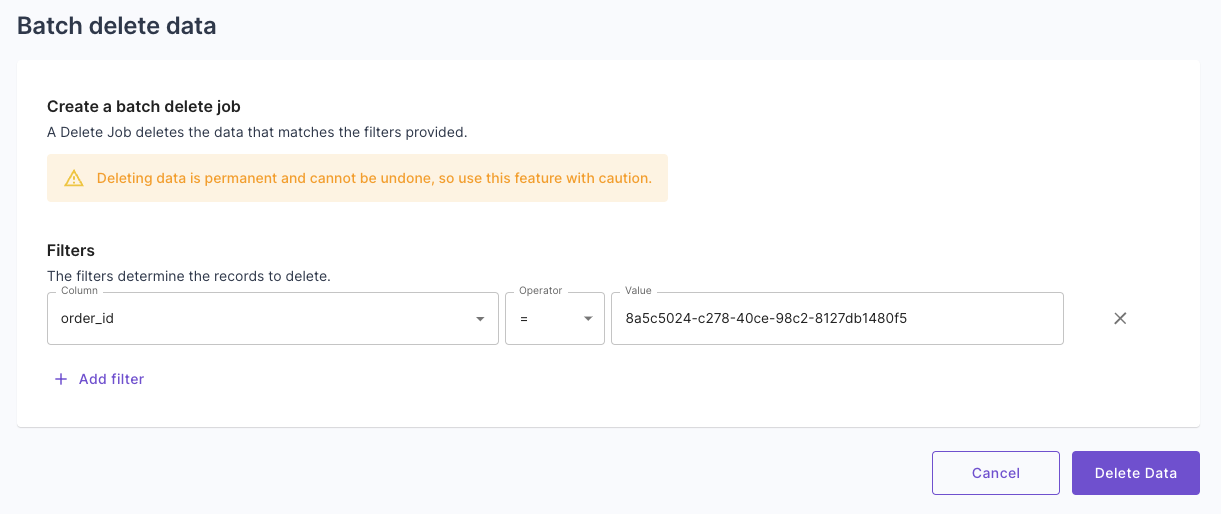 Lastly, you can see the progress of the delete job and when it is completed.
 Here's an example of how to delete data using the API (read the docs for more details):
```graphql theme={"system"}
mutation {
createDeletionJob(input: {
dataPool: "DPO00000000000000000000000000"
filterSql: "restaurant_name='Farolito' AND taco_name='Veggie'"
}) {
job {
id
status
progress
error {
message
}
}
}
}
```
***
Remember, deleting data is permanent and cannot be undone, so use this feature cautiously.
Here's an example of how to delete data using the API (read the docs for more details):
```graphql theme={"system"}
mutation {
createDeletionJob(input: {
dataPool: "DPO00000000000000000000000000"
filterSql: "restaurant_name='Farolito' AND taco_name='Veggie'"
}) {
job {
id
status
progress
error {
message
}
}
}
}
```
***
Remember, deleting data is permanent and cannot be undone, so use this feature cautiously.