> ## Documentation Index
> Fetch the complete documentation index at: https://www.propeldata.com/llms.txt
> Use this file to discover all available pages before exploring further.
# Default timestamp
> How to select and use the optimal default timestamp for your Data Pool
This guide explains how to choose the default timestamp for your Data Pool in Propel's Serverless ClickHouse.
## What is a Default Timestamp?
A default timestamp is an optional property of a Data Pool that:
* Provides a time dimension for Metrics
* Simplifies time-based queries for developers
## How to use the default timestamp
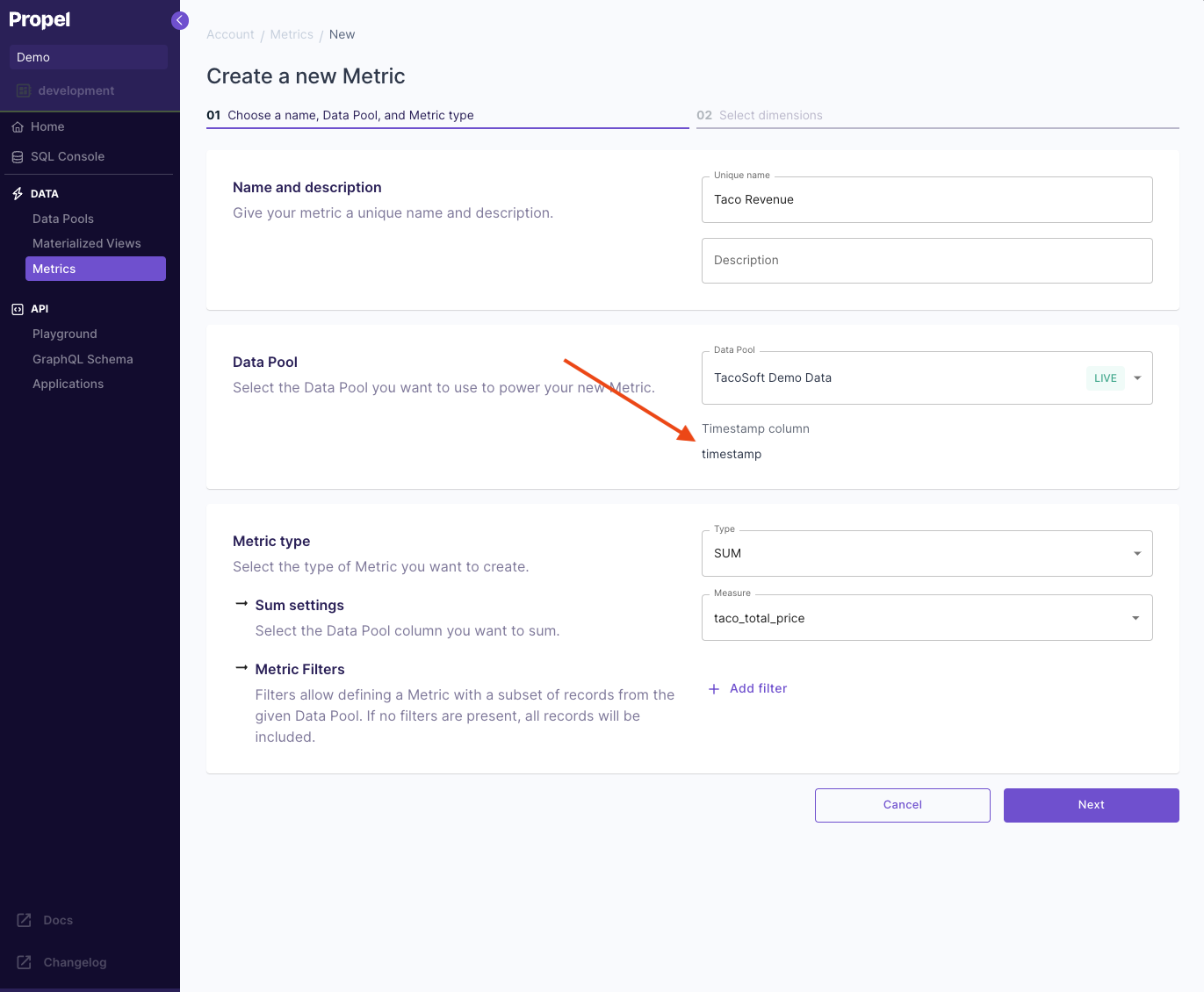
### 1. Metric creation
When defining a Metric, Propel automatically uses the Data Pool's default timestamp as the time dimension.
 ### 2. Streamlined time series queries
With a default timestamp, you can omit the timestamp specification in time range queries.
Example query using the default timestamp. Note that the `timestamp` field is not specified:
```graphql theme={"system"}
query TimeSeriesQuery {
timeSeries(input: {
metric: {
count: {
dataPool: {
name: "TacoSoft Demo Data"
}
}
},
timeZone: "UTC",
granularity: "DAY",
timeRange: {
relative: "LAST_N_DAYS",
n: 30,
},
filters: []
}) {
labels
values
}
}
```
## How to select a good default timestamp for your Data Pool
To select a good default timestamp, consider two factors:
1. The default timestamp should be the primary time dimension that you filter on.
2. It should be part of the sorting key to ensure good query performance. For more information on the sorting key, see [How to select a table engine and sorting key](https://www.notion.so/How-to-select-a-table-engine-and-sorting-key-20c8b9d984344dcaa636c2c87ca57a94?pvs=21).
## Querying with a different timestamp
Even when you define a default timestamp for a Data Pool, you can still query it using a different timestamp by specifying it in the query.
The query below shows how to pass a different timestamp at query time:
```graphql theme={"system"}
query TimeSeriesQuery {
timeSeries(input: {
metric: {
count: {
dataPool: {
name: "TacoSoft Demo Data"
}
}
},
timeZone: "UTC",
granularity: "DAY",
timeRange: {
relative: "LAST_N_DAYS",
n: 30,
timestamp: "order_item_generated_at"
},
filters: []
}) {
labels
values
}
}
```
### 2. Streamlined time series queries
With a default timestamp, you can omit the timestamp specification in time range queries.
Example query using the default timestamp. Note that the `timestamp` field is not specified:
```graphql theme={"system"}
query TimeSeriesQuery {
timeSeries(input: {
metric: {
count: {
dataPool: {
name: "TacoSoft Demo Data"
}
}
},
timeZone: "UTC",
granularity: "DAY",
timeRange: {
relative: "LAST_N_DAYS",
n: 30,
},
filters: []
}) {
labels
values
}
}
```
## How to select a good default timestamp for your Data Pool
To select a good default timestamp, consider two factors:
1. The default timestamp should be the primary time dimension that you filter on.
2. It should be part of the sorting key to ensure good query performance. For more information on the sorting key, see [How to select a table engine and sorting key](https://www.notion.so/How-to-select-a-table-engine-and-sorting-key-20c8b9d984344dcaa636c2c87ca57a94?pvs=21).
## Querying with a different timestamp
Even when you define a default timestamp for a Data Pool, you can still query it using a different timestamp by specifying it in the query.
The query below shows how to pass a different timestamp at query time:
```graphql theme={"system"}
query TimeSeriesQuery {
timeSeries(input: {
metric: {
count: {
dataPool: {
name: "TacoSoft Demo Data"
}
}
},
timeZone: "UTC",
granularity: "DAY",
timeRange: {
relative: "LAST_N_DAYS",
n: 30,
timestamp: "order_item_generated_at"
},
filters: []
}) {
labels
values
}
}
```