> ## Documentation Index
> Fetch the complete documentation index at: https://www.propeldata.com/llms.txt
> Use this file to discover all available pages before exploring further.
# Fivetran to ClickHouse
> Ingest data using Fivetran.
Synchronize data from over [400 sources](https://www.fivetran.com/connectors) to Propel's Serverless ClickHouse.
Contact us if you are interesting in getting early access to the Fivetran destination to sync your data to Propel.
Step-by-step instructions to connect any Fivetran source to Propel.
Check out the Propel Fivetran destination docs.
## Features
Data Pools created with the Fivetran destination are [Webhook Data Pools](/docs/ingestion/webhooks/overview) that support the following features:
| Feature name | Supported | Notes |
| ----------------------------------- | --------- | --------------------------------------------------------------------------------------------------------- |
| Syncs inserts, updates, and deletes | ✅ | Propel processes inserts, updates, and deletes sent from Fivetran. |
| Re-sync | ✅ | You can trigger a resync in Fivetran. |
| Configurable sync interval | ✅ | You can configure sync interval in Fivetran. |
| Sync Pausing / Resuming | ✅ | You can pause / resume syncs in Fivetran. |
| Schema Changes: Add Column | ✅ | When Fivetran detects a column was added in your source, it will automatically add that column in Propel. |
| Schema Changes: Change column types | ❌ | Changing columns types is not supported as it is a breaking schema change. |
| Schema Changes: Delete column | ❌ | Deleting columns is not supported as it is a breaking schema change. |
| Batch Delete API | ✅ | See [Batch Delete API](/docs/deleting-data#batch-deletes). |
| Batch Update API | ✅ | See [Batch Update API](/docs/updating-data#batch-updates). |
| API configurable | ✅ | See [API](/docs/management-api) docs. |
| Terraform configurable | ✅ | See [Terraform](/docs/terraform/) docs. |
## How does the Fivetran destination work?
When syncing a Fivetran source, Propel creates a Webhook Data Pool for each table. For example, a Google Search Console Fivetran source would result in multiple Data Pools:
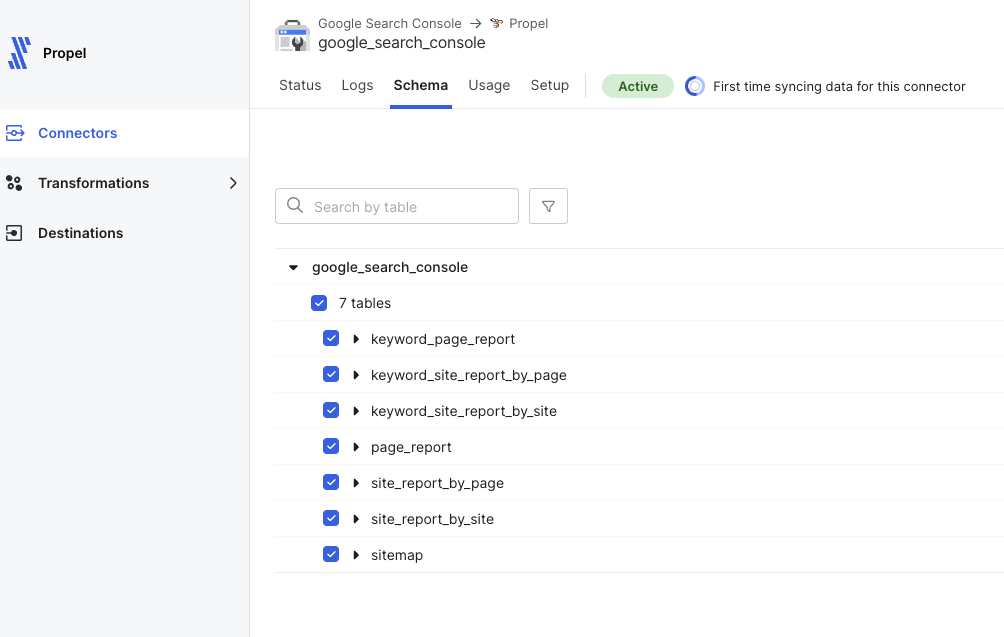 Each Data Pool mirrors its source table's structure, with additional columns:
| Column | Type | Description |
| --------------------- | ----------- | ------------------------------------------- |
| `_propel_received_at` | `TIMESTAMP` | UTC timestamp of Propel's receipt |
| `_propel_payload` | `JSON` | Event's JSON payload |
| `_fivetran_synced` | `TIMESTAMP` | UTC timestamp of Fivetran's sync initiation |
Fivetran performs initial and subsequent syncs based on your configured frequency, sending data to Propel's Webhook Data Pool API for processing and querying via SQL and API.
### Key configurations
* **Default Timestamp:** First timestamp column or `_propel_received_at` if none exists.
* **Primary Key:** Source table's primary key or a Fivetran-generated unique ID if absent.
* **Sort Key:** Combination of primary key and default timestamp.
### Data handling
* **Updates:** Identified and applied using the primary key.
* **Deletes:** Processed based on delete events from Fivetran using the primary key.
### Schema changes
Propel automatically adds new columns detected by Fivetran. Column type changes or deletions are not supported due to their breaking nature.
## Data types
The following table illustrates how we transform your Fivetran data types into Propel-supported types:
| FIVETRAN DATA TYPE | PROPEL DATA TYPE |
| ------------------ | ---------------- |
| `BOOLEAN` | `BOOLEAN` |
| `SHORT` | `INT16` |
| `INT` | `INT32` |
| `LONG` | `INT64` |
| `BIGDECIMAL` | `DOUBLE` |
| `FLOAT` | `FLOAT` |
| `DOUBLE` | `DOUBLE` |
| `LOCALDATE` | `DATE` |
| `LOCALDATETIME` | `TIMESTAMP` |
| `INSTANT` | `TIMESTAMP` |
| `STRING` | `STRING` |
| `XML` | `STRING` |
| `JSON` | `JSON` |
| `BINARY` | `STRING` |
## Transforming data
Once your data is in a Webhook Data Pool, you can use [Materialized Views](/docs/materialized-views) to:
* [Flatten nested JSON into tabular form](/docs/materialized-views#example-1-flatten-nested-json-into-tabular-form)
* [Flatten JSON array into individual rows](/docs/materialized-views#example-2-flatten-json-array-into-individual-rows)
* [Combine data from multiple source Data Pools through JOINs](/docs/materialized-views#example-3-combines-data-from-multiple-source-tables-through-joins)
* [Calculate new derived columns from existing data](/docs/materialized-views#example-4-calculates-new-derived-columns-from-existing-data)
* [Perform incremental aggregations](/docs/materialized-views#example-5-perform-incremental-aggregations)
* [Sort rows with a different sorting key](/docs/materialized-views#example-6-sorts-rows-with-a-different-sorting-key)
* [Filter out unnecessary data based on conditions](/docs/materialized-views#example-7-filters-out-unnecessary-data-based-on-conditions)
* [De-duplicate rows](/docs/materialized-views#example-8-deduplicating-rows)
Each Data Pool mirrors its source table's structure, with additional columns:
| Column | Type | Description |
| --------------------- | ----------- | ------------------------------------------- |
| `_propel_received_at` | `TIMESTAMP` | UTC timestamp of Propel's receipt |
| `_propel_payload` | `JSON` | Event's JSON payload |
| `_fivetran_synced` | `TIMESTAMP` | UTC timestamp of Fivetran's sync initiation |
Fivetran performs initial and subsequent syncs based on your configured frequency, sending data to Propel's Webhook Data Pool API for processing and querying via SQL and API.
### Key configurations
* **Default Timestamp:** First timestamp column or `_propel_received_at` if none exists.
* **Primary Key:** Source table's primary key or a Fivetran-generated unique ID if absent.
* **Sort Key:** Combination of primary key and default timestamp.
### Data handling
* **Updates:** Identified and applied using the primary key.
* **Deletes:** Processed based on delete events from Fivetran using the primary key.
### Schema changes
Propel automatically adds new columns detected by Fivetran. Column type changes or deletions are not supported due to their breaking nature.
## Data types
The following table illustrates how we transform your Fivetran data types into Propel-supported types:
| FIVETRAN DATA TYPE | PROPEL DATA TYPE |
| ------------------ | ---------------- |
| `BOOLEAN` | `BOOLEAN` |
| `SHORT` | `INT16` |
| `INT` | `INT32` |
| `LONG` | `INT64` |
| `BIGDECIMAL` | `DOUBLE` |
| `FLOAT` | `FLOAT` |
| `DOUBLE` | `DOUBLE` |
| `LOCALDATE` | `DATE` |
| `LOCALDATETIME` | `TIMESTAMP` |
| `INSTANT` | `TIMESTAMP` |
| `STRING` | `STRING` |
| `XML` | `STRING` |
| `JSON` | `JSON` |
| `BINARY` | `STRING` |
## Transforming data
Once your data is in a Webhook Data Pool, you can use [Materialized Views](/docs/materialized-views) to:
* [Flatten nested JSON into tabular form](/docs/materialized-views#example-1-flatten-nested-json-into-tabular-form)
* [Flatten JSON array into individual rows](/docs/materialized-views#example-2-flatten-json-array-into-individual-rows)
* [Combine data from multiple source Data Pools through JOINs](/docs/materialized-views#example-3-combines-data-from-multiple-source-tables-through-joins)
* [Calculate new derived columns from existing data](/docs/materialized-views#example-4-calculates-new-derived-columns-from-existing-data)
* [Perform incremental aggregations](/docs/materialized-views#example-5-perform-incremental-aggregations)
* [Sort rows with a different sorting key](/docs/materialized-views#example-6-sorts-rows-with-a-different-sorting-key)
* [Filter out unnecessary data based on conditions](/docs/materialized-views#example-7-filters-out-unnecessary-data-based-on-conditions)
* [De-duplicate rows](/docs/materialized-views#example-8-deduplicating-rows)