> ## Documentation Index
> Fetch the complete documentation index at: https://www.propeldata.com/llms.txt
> Use this file to discover all available pages before exploring further.
# Webhooks to ClickHouse
> Ingest JSON events via HTTP.
Create a Webhook endpoint to ingest JSON events to Propel.
Step-by-step instructions to ingest events via Webhooks to Propel.
## Architecture
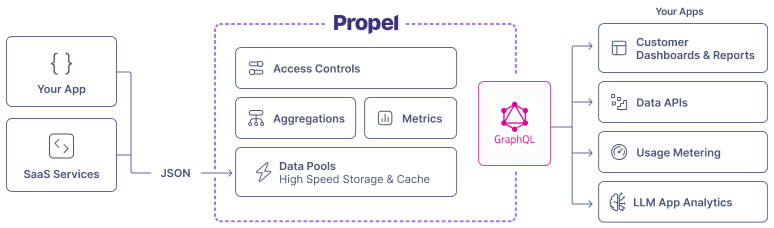
Webhook Data Pools provide an HTTP URL to send events from your applications, streaming infrastructure, or SaaS applications to ingest into Propel.
 ## Features
Webhook Data Pools supports the following features:
| Feature name | Supported | Notes |
| ---------------------- | --------- | --------------------------------------------------------------------------- |
| Event collection | ✅ | Collects events in JSON format. |
| Real-time updates | ✅ | See the [Real-time updates](/docs/updating-data#real-time-updates) section. |
| Real-time deletes | ✅ | See the [Real-time deletes](/docs/deleting-data#real-time-deletes) section. |
| Batch Delete API | ✅ | See [Batch Delete API](/docs/deleting-data#batch-deletes). |
| Batch Update API | ✅ | See [Batch Update API](/docs/updating-data#batch-updates). |
| Bulk insert | ✅ | Up to 500 events per HTTP request. |
| API configurable | ✅ | See [API](/docs/management-api) docs. |
| Terraform configurable | ✅ | See [Terraform](/docs/terraform) docs. |
## How does the Webhook Data Pool work?
Creating a Webhook Data Pool provides you with an HTTP URL for posting JSON events.
The posted events are collected in the Data Pool and can be accessed using [SQL](/docs/sql-reference/) or the [Query APIs](/docs/query-apis).
## Features
Webhook Data Pools supports the following features:
| Feature name | Supported | Notes |
| ---------------------- | --------- | --------------------------------------------------------------------------- |
| Event collection | ✅ | Collects events in JSON format. |
| Real-time updates | ✅ | See the [Real-time updates](/docs/updating-data#real-time-updates) section. |
| Real-time deletes | ✅ | See the [Real-time deletes](/docs/deleting-data#real-time-deletes) section. |
| Batch Delete API | ✅ | See [Batch Delete API](/docs/deleting-data#batch-deletes). |
| Batch Update API | ✅ | See [Batch Update API](/docs/updating-data#batch-updates). |
| Bulk insert | ✅ | Up to 500 events per HTTP request. |
| API configurable | ✅ | See [API](/docs/management-api) docs. |
| Terraform configurable | ✅ | See [Terraform](/docs/terraform) docs. |
## How does the Webhook Data Pool work?
Creating a Webhook Data Pool provides you with an HTTP URL for posting JSON events.
The posted events are collected in the Data Pool and can be accessed using [SQL](/docs/sql-reference/) or the [Query APIs](/docs/query-apis).
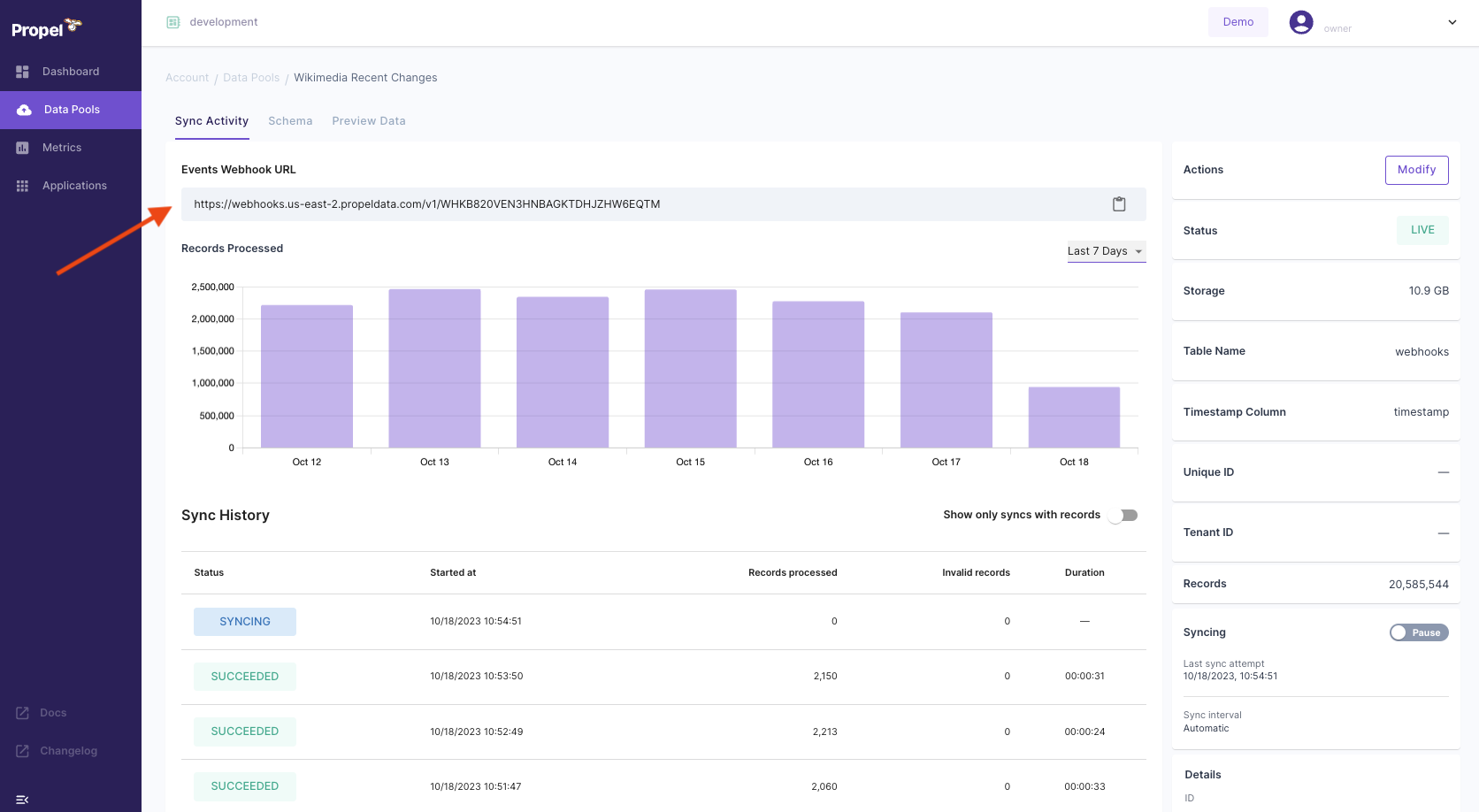 By default, the Webhook Data Pool has two columns:
| Column | Type | Description |
| --------------------- | --------- | -------------------------------------------------- |
| `_propel_received_at` | TIMESTAMP | The timestamp when the event was collected in UTC. |
| `_propel_payload` | JSON | The JSON Payload of the event. |
When creating a Webhook Data Pool, you can flatten top-level or nested JSON keys into specific columns.
See our [step-by-step setup guide](/docs/ingestion/webhooks/setup).
### Authentication
You can add basic authentication to your HTTP endpoint to secure your URL. If these parameters are not provided, anyone with the URL to your webhook will be able to post events.
By default, the Webhook Data Pool has two columns:
| Column | Type | Description |
| --------------------- | --------- | -------------------------------------------------- |
| `_propel_received_at` | TIMESTAMP | The timestamp when the event was collected in UTC. |
| `_propel_payload` | JSON | The JSON Payload of the event. |
When creating a Webhook Data Pool, you can flatten top-level or nested JSON keys into specific columns.
See our [step-by-step setup guide](/docs/ingestion/webhooks/setup).
### Authentication
You can add basic authentication to your HTTP endpoint to secure your URL. If these parameters are not provided, anyone with the URL to your webhook will be able to post events.
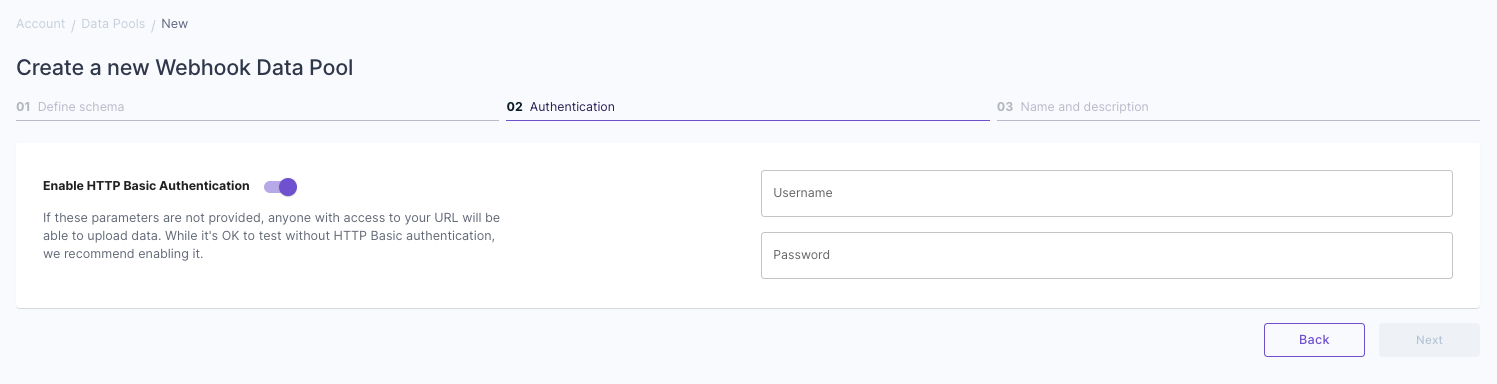 We recommend enabling authentication in production.
### Sending individual JSON events
Send individual events by POSTing the JSON event in the request body.
```bash theme={"system"}
curl https://webhooks.us-east-2.propeldata.com/v1/WHK... \
-X POST \
-H "Content-Type: application/json" \
-d '{
"customer_id": 5,
"order_id": 34,
"store_id": 4445,
"order_details": {
"taco_count": 7,
"total_price": 25.90,
"checkout_time": "2023-07-31T15:20:10Z"
},
"created_at": "2023-07-31T14:50:35Z"
}'
```
### Sending a batch of JSON events
Send a batch of JSON events by POSTing a JSON array of events in the request body. Each request can have a maximum of 500 events in the array.
```bash theme={"system"}
curl https://webhooks.us-east-2.propeldata.com/v1/WHK... \
-X POST \
-H "Content-Type: application/json" \
-d '[
{
"customer_id": 5,
"order_id": 34,
"store_id": 4445,
"order_details": {
"taco_count": 7,
"total_price": 25.90,
"checkout_time": "2023-07-31T15:20:10Z"
},
"created_at": "2023-07-31T14:50:35Z"
},
{
"customer_id": 8,
"order_id": 22,
"store_id": 1199,
"order_details": {
"taco_count": 3,
"total_price": 15.75,
"checkout_time": "2023-07-31T12:40:21Z"
},
"created_at": "2023-07-31T12:30:55Z"
}
]'
```
### Errors
* **HTTP 429 Too Many Requests** - Returned when your application is being rate limited by Propel. Retry with exponential backoff.
* **HTTP 413 Content Too Large** - Returned if there are more than 500 events in a single request or the payload exceeds 1,048,320 bytes. Fix the request; retrying won't help.
* **HTTP 400 Bad Request** - Returned when the schema is incorrect and Propel is rejecting the request. Fix the request; retrying won't help.
* **HTTP 500 Internal Server Error** - Returned if something went wrong in Propel. Retry with exponential backoff.
Use the `disable_partial_success=true` query parameter to make sure that if any event in a batch fails validation, the entire request will fail.
For example: `https://webhooks.us-east-2.propeldata.com/v1/WHK00000000000000000000000000?disable_partial_success=true`
## Schema changes
The Webhook Data Pool is designed to handle semi-structured, schema-less JSON data. This flexibility allows you to add new properties to your payload as needed. The entire payload is always stored in the `_propel_payload` column.
However, Propel enforces the schema for required fields. If you stop providing data for a required field that was previously unpacked into its own column, Propel will return an error.
### Adding Columns
Go to the Data Pool and click the **"Schema"** tab.
We recommend enabling authentication in production.
### Sending individual JSON events
Send individual events by POSTing the JSON event in the request body.
```bash theme={"system"}
curl https://webhooks.us-east-2.propeldata.com/v1/WHK... \
-X POST \
-H "Content-Type: application/json" \
-d '{
"customer_id": 5,
"order_id": 34,
"store_id": 4445,
"order_details": {
"taco_count": 7,
"total_price": 25.90,
"checkout_time": "2023-07-31T15:20:10Z"
},
"created_at": "2023-07-31T14:50:35Z"
}'
```
### Sending a batch of JSON events
Send a batch of JSON events by POSTing a JSON array of events in the request body. Each request can have a maximum of 500 events in the array.
```bash theme={"system"}
curl https://webhooks.us-east-2.propeldata.com/v1/WHK... \
-X POST \
-H "Content-Type: application/json" \
-d '[
{
"customer_id": 5,
"order_id": 34,
"store_id": 4445,
"order_details": {
"taco_count": 7,
"total_price": 25.90,
"checkout_time": "2023-07-31T15:20:10Z"
},
"created_at": "2023-07-31T14:50:35Z"
},
{
"customer_id": 8,
"order_id": 22,
"store_id": 1199,
"order_details": {
"taco_count": 3,
"total_price": 15.75,
"checkout_time": "2023-07-31T12:40:21Z"
},
"created_at": "2023-07-31T12:30:55Z"
}
]'
```
### Errors
* **HTTP 429 Too Many Requests** - Returned when your application is being rate limited by Propel. Retry with exponential backoff.
* **HTTP 413 Content Too Large** - Returned if there are more than 500 events in a single request or the payload exceeds 1,048,320 bytes. Fix the request; retrying won't help.
* **HTTP 400 Bad Request** - Returned when the schema is incorrect and Propel is rejecting the request. Fix the request; retrying won't help.
* **HTTP 500 Internal Server Error** - Returned if something went wrong in Propel. Retry with exponential backoff.
Use the `disable_partial_success=true` query parameter to make sure that if any event in a batch fails validation, the entire request will fail.
For example: `https://webhooks.us-east-2.propeldata.com/v1/WHK00000000000000000000000000?disable_partial_success=true`
## Schema changes
The Webhook Data Pool is designed to handle semi-structured, schema-less JSON data. This flexibility allows you to add new properties to your payload as needed. The entire payload is always stored in the `_propel_payload` column.
However, Propel enforces the schema for required fields. If you stop providing data for a required field that was previously unpacked into its own column, Propel will return an error.
### Adding Columns
Go to the Data Pool and click the **"Schema"** tab.
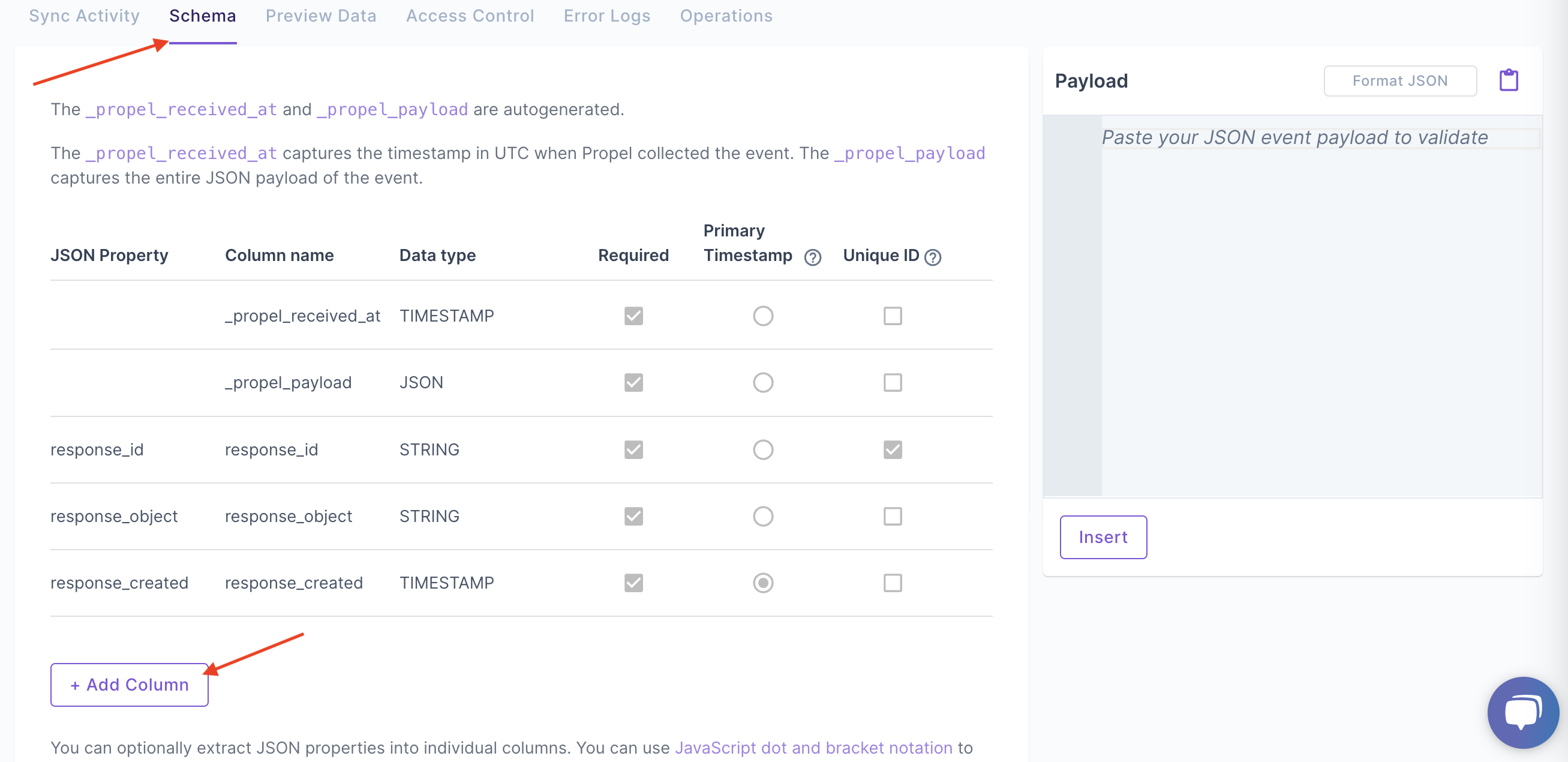 Click the **"Add Column"** button to define the new column.
Specify the JSON property to extract, the column name, and the type and click **"Add column"**.
Click the **"Add Column"** button to define the new column.
Specify the JSON property to extract, the column name, and the type and click **"Add column"**.
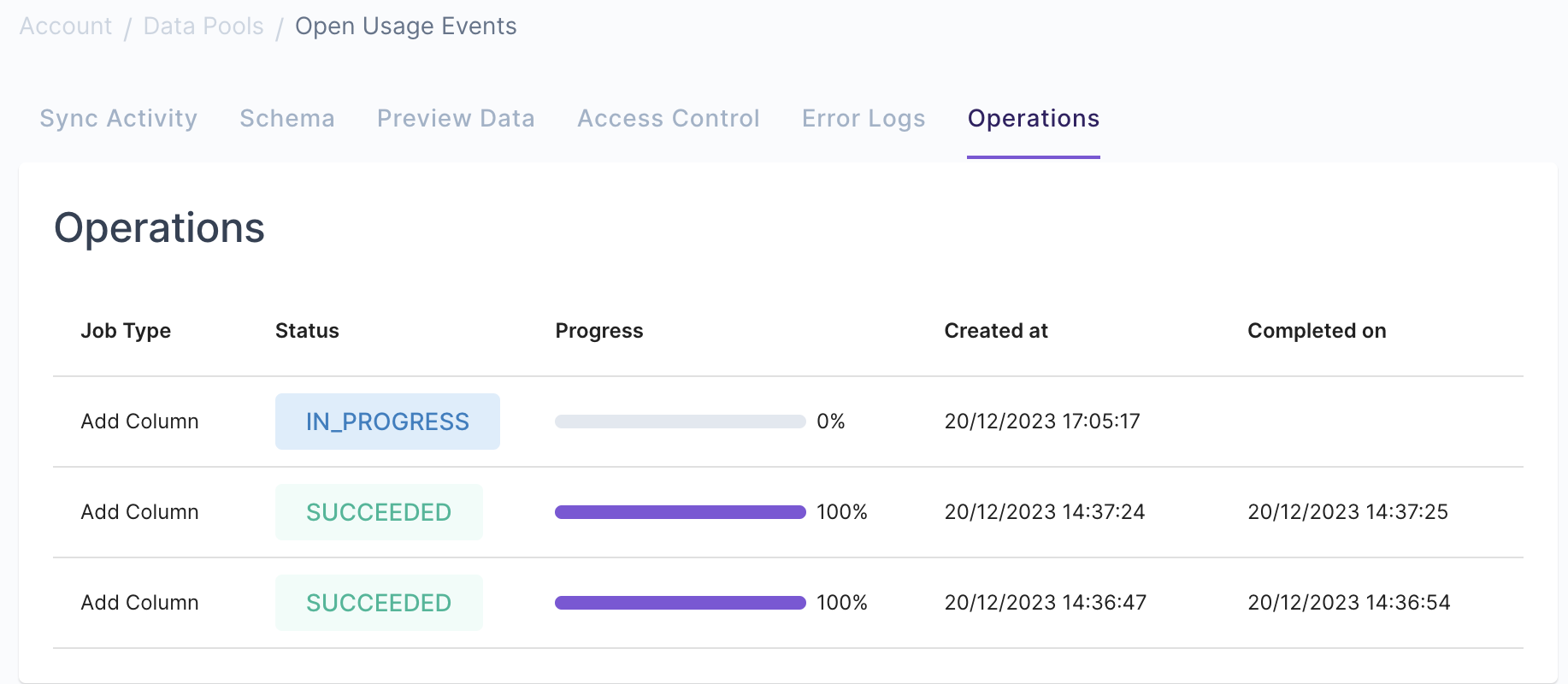
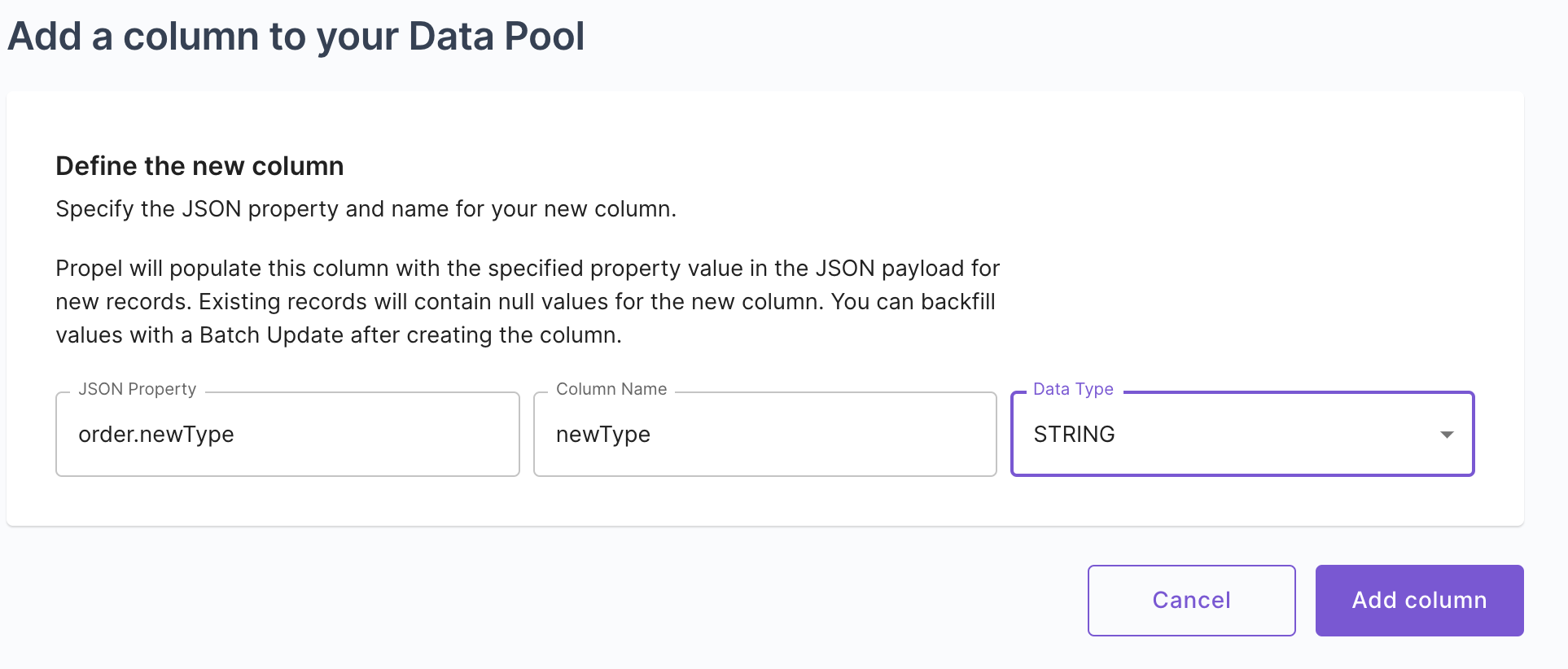 After clicking adding the column, an asynchronous operation will begin to add the column to the Data Pool. You can track the progress in the **"Operations"** tab.
 Note that adding a column does not backfill existing rows. To backfill, run a [batch update operation](/docs/updating-data#batch-updates).
Column deletions, modifications, and data type changes are not supported as they are breaking changes to the schema. If you need to change the schema, you can create a new Data Pool.
## Data Types
The table below shows the default mappings from JSON types to Propel types. You can change these mappings when creating a Webhook Data Pool.
| JSON Type | Propel Type |
| --------- | ----------- |
| String | STRING |
| Number | DOUBLE |
| Object | JSON |
| Array | JSON |
| Boolean | BOOLEAN |
| Null | JSON |
## Limits
* Each POST request can include up to 500 events (as a JSON array).
* The payload size can be up to 1 MiB.
## Best Practices
* Send as many events per request as possible, up to 500 events or 1,048,320 bytes, to speed up ingestion.
* Retry on 429 (Too Many Requests) and 500 (Internal Server Error) responses with exponential backoff to ensure no events are lost.
* Alert or page on 413 (Content Too Large) errors. This indicates the event count or payload size was exceeded, and retrying will not help.
* Create the Webhook Data Pool with all required fields. Use a sample event and the "Extract top-level fields" feature during the creation process.
* Set the primary timestamp to the correct event timestamp. If not set, `_propel_received_at` will be used by default.
* Mark all fields except the primary timestamp as not required to reduce 400 (Bad Request) errors. This allows Propel to accept the request even if some data is missing, and you can backfill the missing data later.
* Alert or page on 400 errors. This indicates a schema issue that needs investigation, as retrying will not help.
* Verify all data types. Ensure objects, arrays, and dictionaries are set as JSON in Propel.
* Enable basic authentication on the Webhook Data Pool to secure the endpoint.
## Transforming data
Once your data is in a Webhook Data Pool, you can use [Materialized Views](/docs/materialized-views) to:
* [Flatten nested JSON into tabular form](/docs/materialized-views#example-1-flatten-nested-json-into-tabular-form)
* [Flatten JSON array into individual rows](/docs/materialized-views#example-2-flatten-json-array-into-individual-rows)
* [Combine data from multiple source Data Pools through JOINs](/docs/materialized-views#example-3-combines-data-from-multiple-source-tables-through-joins)
* [Calculate new derived columns from existing data](/docs/materialized-views#example-4-calculates-new-derived-columns-from-existing-data)
* [Perform incremental aggregations](/docs/materialized-views#example-5-perform-incremental-aggregations)
* [Sort rows with a different sorting key](/docs/materialized-views#example-6-sorts-rows-with-a-different-sorting-key)
* [Filter out unnecessary data based on conditions](/docs/materialized-views#example-7-filters-out-unnecessary-data-based-on-conditions)
* [De-duplicate rows](/docs/materialized-views#example-8-deduplicating-rows)
## Frequently Asked Questions
Once an event is collected, the data will be available in Propel and accessible via SQL or the API within 10 seconds to 2 minutes.
Note that adding a column does not backfill existing rows. To backfill, run a [batch update operation](/docs/updating-data#batch-updates).
Column deletions, modifications, and data type changes are not supported as they are breaking changes to the schema. If you need to change the schema, you can create a new Data Pool.
## Data Types
The table below shows the default mappings from JSON types to Propel types. You can change these mappings when creating a Webhook Data Pool.
| JSON Type | Propel Type |
| --------- | ----------- |
| String | STRING |
| Number | DOUBLE |
| Object | JSON |
| Array | JSON |
| Boolean | BOOLEAN |
| Null | JSON |
## Limits
* Each POST request can include up to 500 events (as a JSON array).
* The payload size can be up to 1 MiB.
## Best Practices
* Send as many events per request as possible, up to 500 events or 1,048,320 bytes, to speed up ingestion.
* Retry on 429 (Too Many Requests) and 500 (Internal Server Error) responses with exponential backoff to ensure no events are lost.
* Alert or page on 413 (Content Too Large) errors. This indicates the event count or payload size was exceeded, and retrying will not help.
* Create the Webhook Data Pool with all required fields. Use a sample event and the "Extract top-level fields" feature during the creation process.
* Set the primary timestamp to the correct event timestamp. If not set, `_propel_received_at` will be used by default.
* Mark all fields except the primary timestamp as not required to reduce 400 (Bad Request) errors. This allows Propel to accept the request even if some data is missing, and you can backfill the missing data later.
* Alert or page on 400 errors. This indicates a schema issue that needs investigation, as retrying will not help.
* Verify all data types. Ensure objects, arrays, and dictionaries are set as JSON in Propel.
* Enable basic authentication on the Webhook Data Pool to secure the endpoint.
## Transforming data
Once your data is in a Webhook Data Pool, you can use [Materialized Views](/docs/materialized-views) to:
* [Flatten nested JSON into tabular form](/docs/materialized-views#example-1-flatten-nested-json-into-tabular-form)
* [Flatten JSON array into individual rows](/docs/materialized-views#example-2-flatten-json-array-into-individual-rows)
* [Combine data from multiple source Data Pools through JOINs](/docs/materialized-views#example-3-combines-data-from-multiple-source-tables-through-joins)
* [Calculate new derived columns from existing data](/docs/materialized-views#example-4-calculates-new-derived-columns-from-existing-data)
* [Perform incremental aggregations](/docs/materialized-views#example-5-perform-incremental-aggregations)
* [Sort rows with a different sorting key](/docs/materialized-views#example-6-sorts-rows-with-a-different-sorting-key)
* [Filter out unnecessary data based on conditions](/docs/materialized-views#example-7-filters-out-unnecessary-data-based-on-conditions)
* [De-duplicate rows](/docs/materialized-views#example-8-deduplicating-rows)
## Frequently Asked Questions
Once an event is collected, the data will be available in Propel and accessible via SQL or the API within 10 seconds to 2 minutes.