> ## Documentation Index
> Fetch the complete documentation index at: https://www.propeldata.com/llms.txt
> Use this file to discover all available pages before exploring further.
# Materialized Views
> Transform data with Materialized Views.
In ClickHouse, Materialized Views are the primary way to transform data. They are a persisted query result that is automatically updated when the underlying data changes.
You can use them to reshape, filter, or enrich data from one or more source Data Pools into a new Data Pool. For example, you could create a Materialized View that:
* [Flattens nested JSON into tabular form](#example-1-flatten-nested-json-into-tabular-form)
* [Flattens JSON array into individual rows](#example-2-flatten-json-array-into-individual-rows)
* [Combines data from multiple source Data Pools through JOINs](#example-3-combines-data-from-multiple-source-tables-through-joins)
* [Calculates new derived columns from existing data](#example-4-calculates-new-derived-columns-from-existing-data)
* [Performs incremental aggregations](#example-5-perform-incremental-aggregations)
* [Sorts rows with a different sorting key](#example-6-sorts-rows-with-a-different-sorting-key)
* [Filters out unnecessary data based on conditions](#example-7-filters-out-unnecessary-data-based-on-conditions)
* [De-duplicates rows](#example-8-deduplicating-rows)
The transformed data in the destination Data Pool is automatically kept up-to-date as the underlying source data changes.
 ## How do Materialized Views work?
Materialized Views in ClickHouse work by automatically executing a specified SQL query over new data inserted into a source Data Pool and writing the query results into a destination Data Pool.
When creating a Materialized View, you define a SELECT query that transforms or aggregates data from one or more source Data Pools. You also define a destination Data Pool where the resulting data will be written.
## How do Materialized Views work?
Materialized Views in ClickHouse work by automatically executing a specified SQL query over new data inserted into a source Data Pool and writing the query results into a destination Data Pool.
When creating a Materialized View, you define a SELECT query that transforms or aggregates data from one or more source Data Pools. You also define a destination Data Pool where the resulting data will be written.
 Whenever new rows are inserted into the source Data Pools, Propel automatically triggers the Materialized View SQL query over just the new data and writes the results to the destination Data Pool. This allows incrementally updating the destination data Pool without re-computing the entire query from scratch.
Setting the Materialized View's destination to a SummingMergeTree or AggregatingMergeTree Data Pool enables efficient incremental updates and storage of aggregations.
Materialized Views can be chained, with one Materialized View reading from the destination Data Pool of another, enabling multi-stage data transformation pipelines.
## Creating a Materialized View
This section provides step-by-step instructions on creating a Materialized View in the Console, the API, and Terraform.
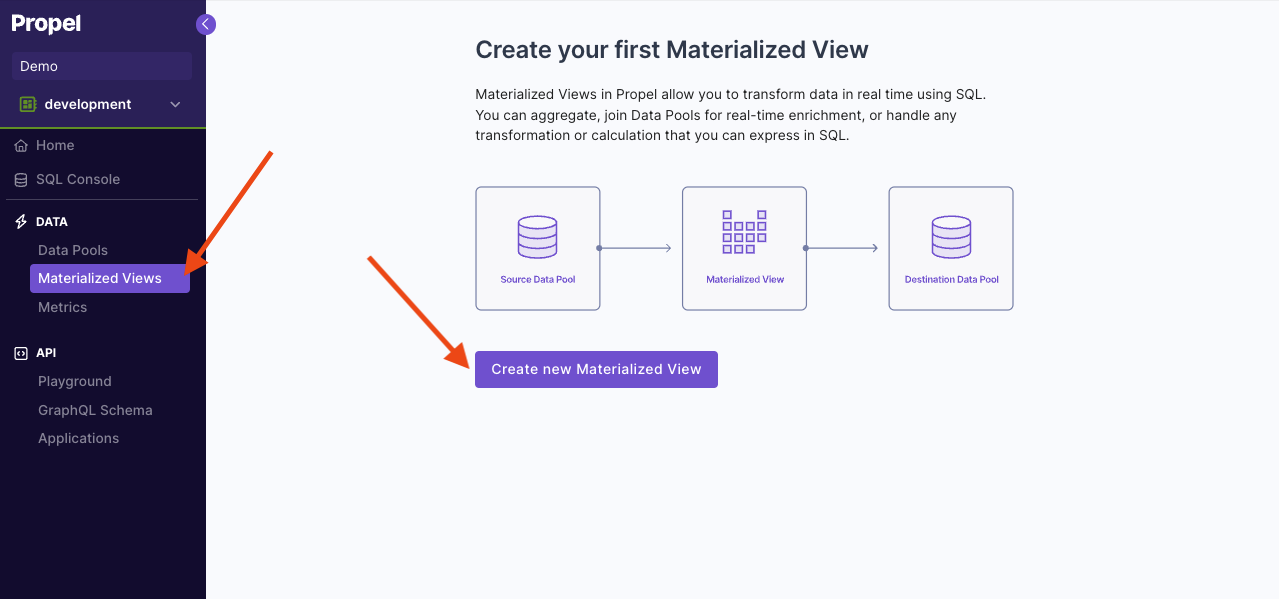
To start, go to the **"Materialized Views"** section of the Console, then click on **"Create new Materialized View"**.
Whenever new rows are inserted into the source Data Pools, Propel automatically triggers the Materialized View SQL query over just the new data and writes the results to the destination Data Pool. This allows incrementally updating the destination data Pool without re-computing the entire query from scratch.
Setting the Materialized View's destination to a SummingMergeTree or AggregatingMergeTree Data Pool enables efficient incremental updates and storage of aggregations.
Materialized Views can be chained, with one Materialized View reading from the destination Data Pool of another, enabling multi-stage data transformation pipelines.
## Creating a Materialized View
This section provides step-by-step instructions on creating a Materialized View in the Console, the API, and Terraform.
To start, go to the **"Materialized Views"** section of the Console, then click on **"Create new Materialized View"**.
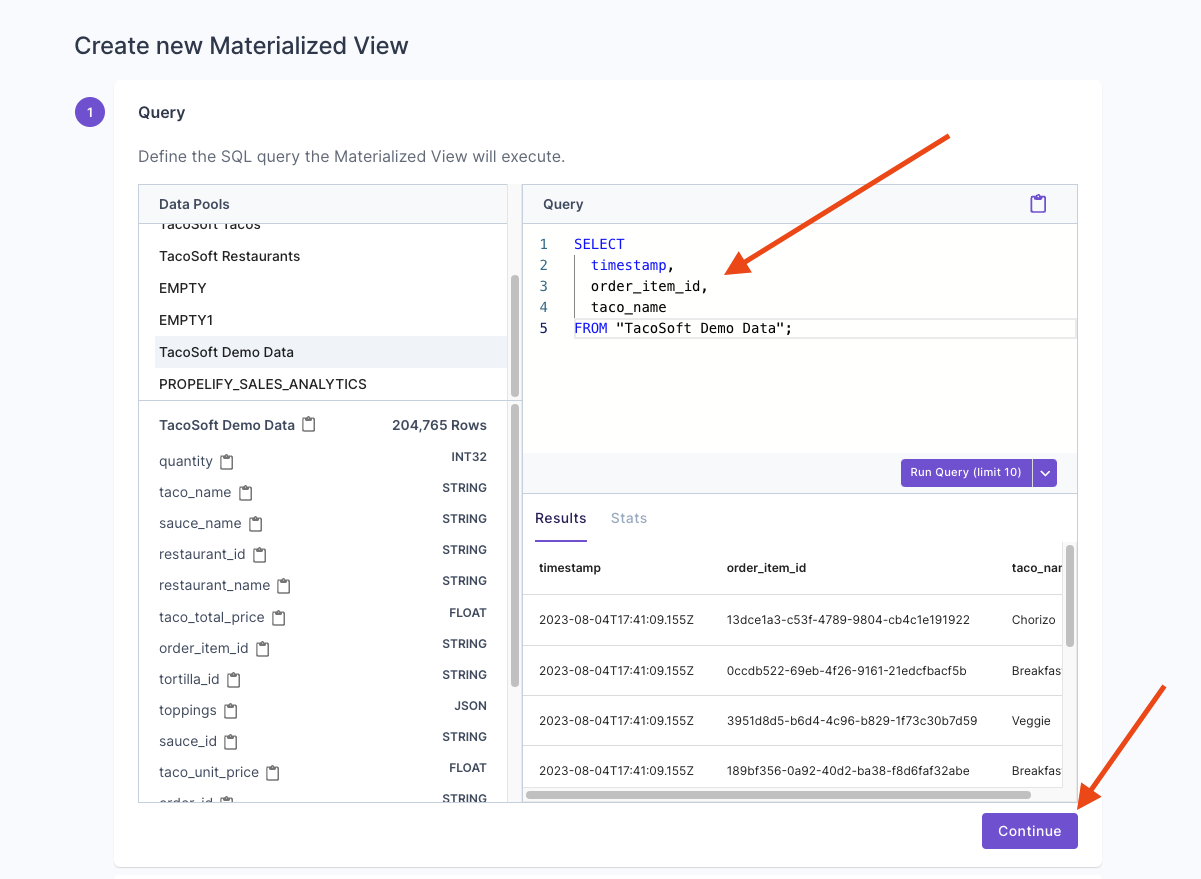
 First, you need to enter the SQL query that will define the transformation. Once you have the query ready, click **"Continue"**.
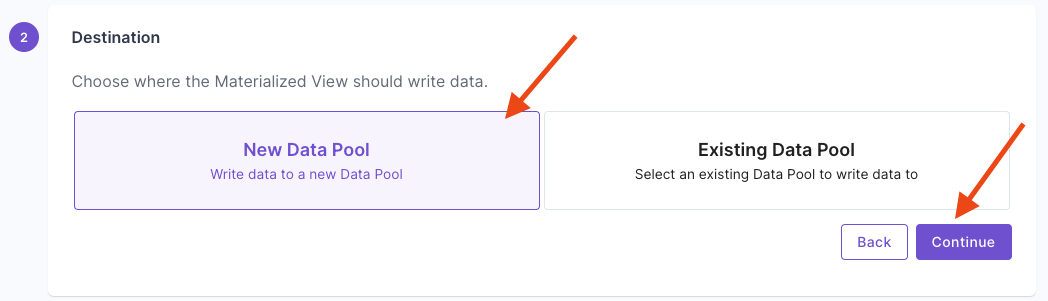
 For this example, we are going to create a new Data Pool, so select **"New Data Pool"** and give it a name.
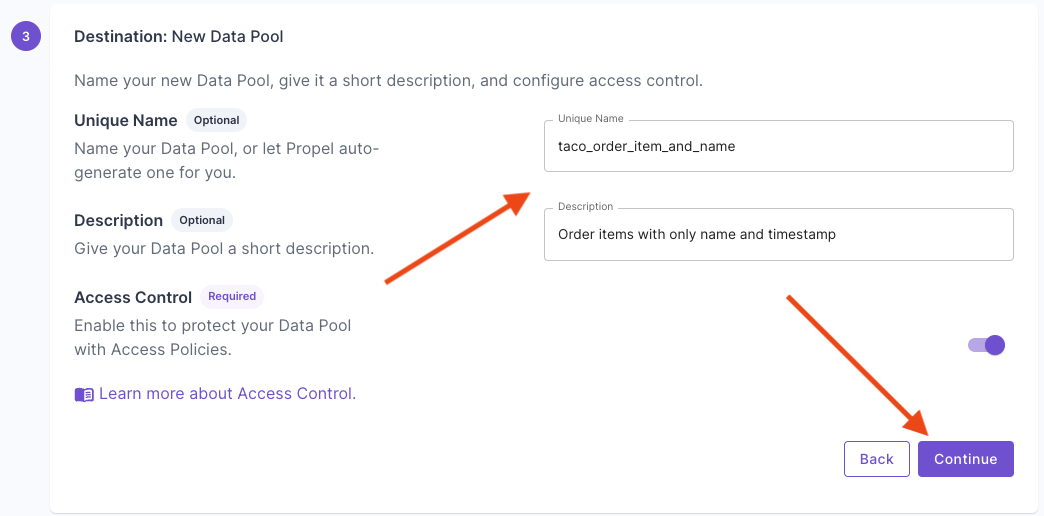 For this example, we are going to use the **"Append-only data"** settings. Answer the questions to generate the table settings. Select the **"timestamp"** column on the first question and click **"Continue"**.
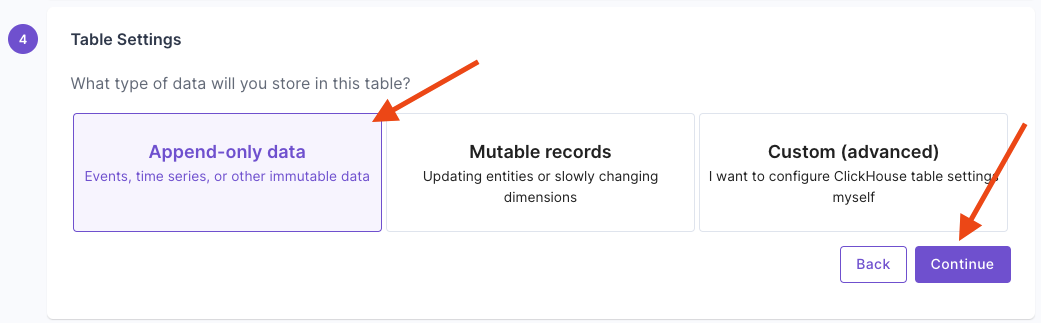
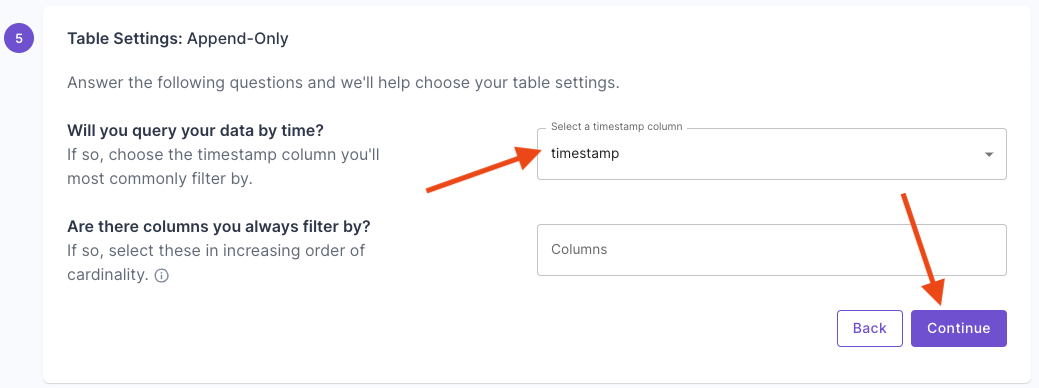 Here, you will see your recommended table settings. Click **"Continue"**.
To learn more, see our [How to select a table engine and sorting key](https://www.propeldata.com/docs/guides/table-engine-and-sorting-key) guide.
Here, you will see your recommended table settings. Click **"Continue"**.
To learn more, see our [How to select a table engine and sorting key](https://www.propeldata.com/docs/guides/table-engine-and-sorting-key) guide.
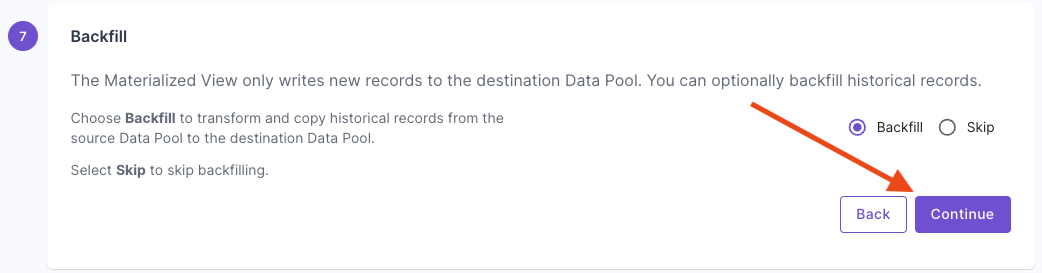
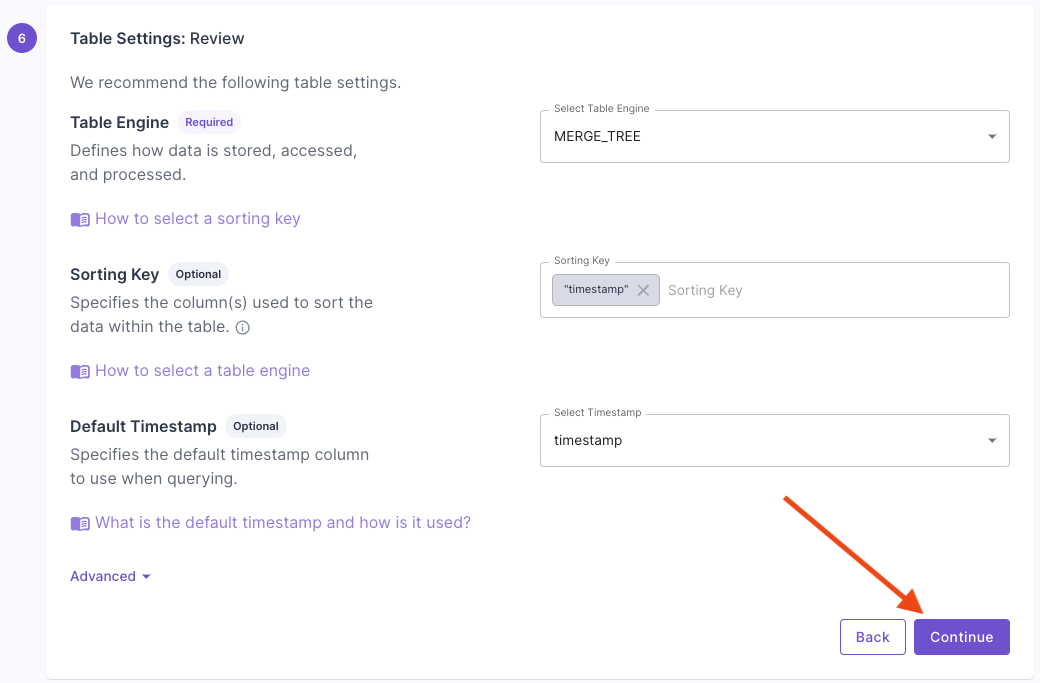 Next, decide whether you want to backfill the existing data in the source Data Pool to the destination Data Pool. In most cases, you'd want to backfill. Propel takes care of this process for you.
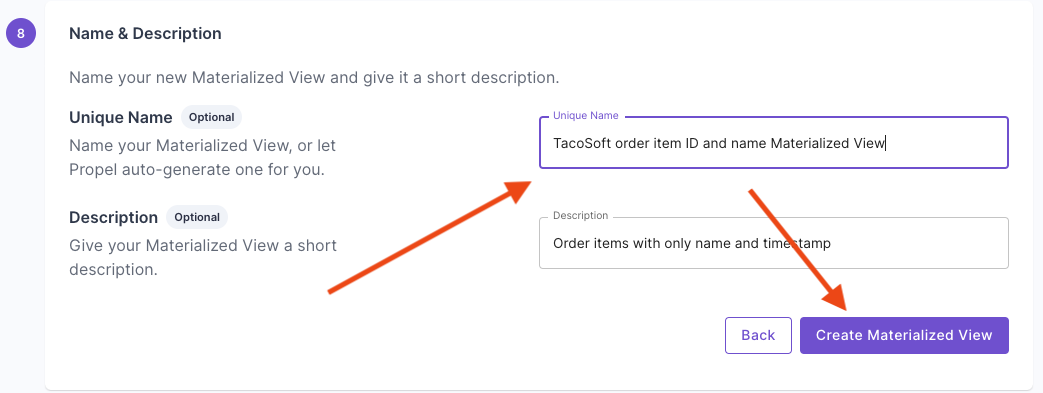
 Lastly, give your Materialized View a name and description.
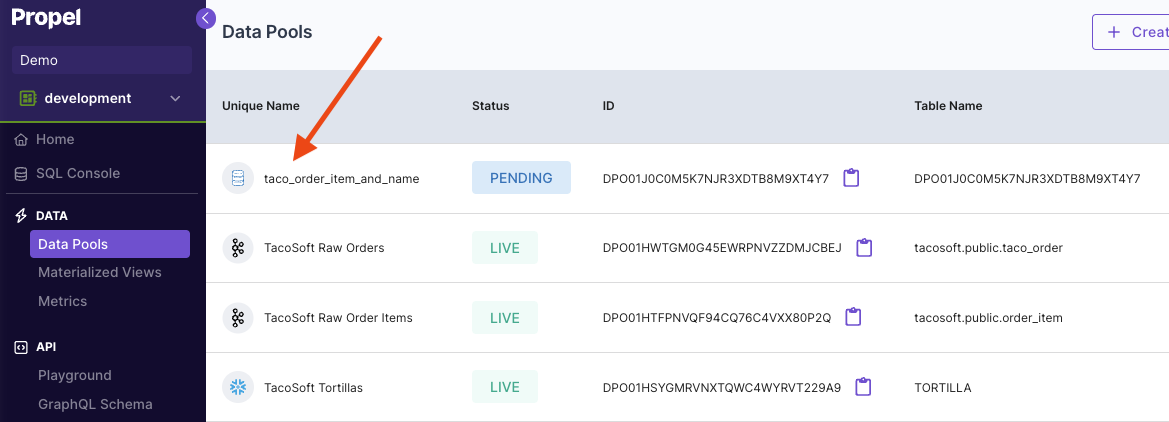
 You'll notice the new Data Pool is created with the new schema and data.
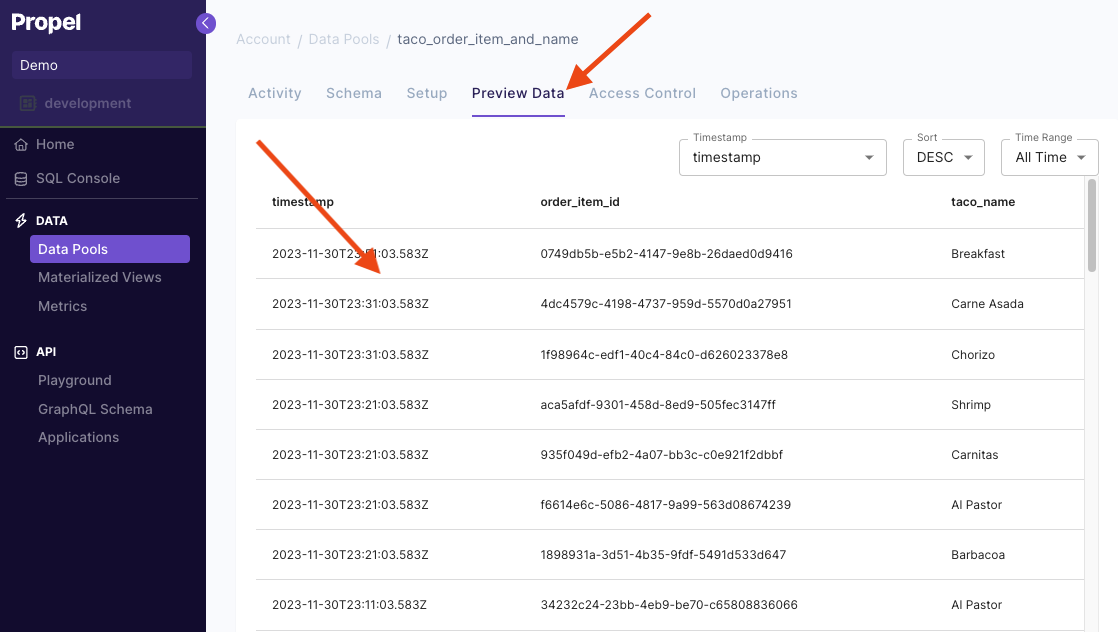
 Click on the **"Preview Data"** tab to see your transformed records.
 ```graphql theme={"system"}
mutation {
createMaterializedView(input: {
uniqueName: "TacoSoft order item ID and name Materialized View",
description: "Order items with only name and timestamp",
sql: """
SELECT
timestamp,
order_item_id,
taco_name
FROM "TacoSoft Demo Data";
""",
destination: {
newDataPool: {
timestamp: {
columnName: "timestamp"
},
uniqueName: "taco_order_item_and_name",
accessControlEnabled: true
}
},
backfillOptions: {
backfill: true
}
}) {
materializedView {
id
sql
uniqueName
}
}
}
```
```hcl theme={"system"}
resource "propel_materialized_view" "my_materialized_view" {
unique_name = "TacoSoft order item ID and name Materialized View"
description = "Order items with only name and timestamp"
sql = <<-SQL
SELECT
timestamp,
order_item_id,
taco_name
FROM "TacoSoft Demo Data";
SQL
new_data_pool {
unique_name = "taco_order_item_and_name"
timestamp = "timestamp"
access_control_enabled = true
}
backfill = true
}
```
***
## Materialized View examples
In this section, we will provide examples of common use cases solved with Materialized Views.
For all the examples, we'll use a source Data Pool called `events` with two columns:
* `_propel_received_at` (TIMESTAMP)
* `_propel_payload` (JSON)
To replicate the examples, create a Webhook Data Pool with just the `_propel_received_at` and `_propel_payload` columns. Then click on the Data Pool, click on “**Schema**” tab and paste the event below to create sample records.
The JSON events in the `_propel_payload` column are of the form:
```json theme={"system"}
{
"customer_id": 5,
"order_id": 34,
"store_id": 4445,
"order_details": {
"taco_count": 7,
"price": 25.90,
"checkout_time": "2023-07-31T15:20:10Z"
},
"created_at": "2023-07-31T14:50:35Z"
}
```
For the API examples, you can copy and paste them to the [API Playground](https://console.propeldata.com/playground/graphql/).
### Example 1: Flatten nested JSON into tabular form
The following Materialized View flattens the JSON into individual columns. In Propel, you can access nested JSON keys by using dot notation, as shown in the example below. We are also using the `parseDateTimeBestEffort` function to parse the timestamp from a string to ClickHouse timestamp.
| Destination Data Pool | |
| --------------------- | ------------ |
| Table Engine | MergeTree |
| Sorting Key | `created_at` |
```sql theme={"system"}
SELECT
_propel_received_at,
"_propel_payload.customer_id" AS customer_id,
"_propel_payload.order_id" AS order_id,
"_propel_payload.store_id" AS store_id,
"_propel_payload.order_details.taco_count"::INTEGER AS taco_count,
"_propel_payload.order_details.price"::DOUBLE AS price,
parseDateTimeBestEffort("_propel_payload.order_details.checkout_time") AS checkout_time,
parseDateTimeBestEffort("_propel_payload.created_at") AS created_at
FROM events
```
```graphql theme={"system"}
mutation {
createMaterializedView(input: {
uniqueName: "Events Materialized View",
description: "Flattens JSON into columns",
sql: """
SELECT
_propel_received_at,
"_propel_payload.customer_id" AS customer_id,
"_propel_payload.order_id" AS order_id,
"_propel_payload.store_id" AS store_id,
"_propel_payload.order_details.taco_count"::INTEGER AS taco_count,
"_propel_payload.order_details.price"::DOUBLE AS price,
parseDateTimeBestEffort("_propel_payload.order_details.checkout_time") AS checkout_time,
parseDateTimeBestEffort("_propel_payload.created_at") AS created_at
FROM events
""",
destination: {
newDataPool: {
timestamp: {
columnName: "created_at"
},
uniqueName: "flattened_events",
accessControlEnabled: true
tableSettings: {
engine: {
mergeTree: {
type: MERGE_TREE
}
}
orderBy: ["created_at"]
}
}
},
backfillOptions: {
backfill: true
}
}) {
materializedView {
id
sql
uniqueName
}
}
}
```
```hcl theme={"system"}
resource "propel_materialized_view" "events_materialized_view" {
unique_name = "Events Materialized View"
description = "Flattens JSON into columns"
sql = <<-SQL
SELECT
_propel_received_at,
"_propel_payload.customer_id" AS customer_id,
"_propel_payload.order_id" AS order_id,
"_propel_payload.store_id" AS store_id,
"_propel_payload.order_details.taco_count"::INTEGER AS taco_count,
"_propel_payload.order_details.price"::DOUBLE AS price,
parseDateTimeBestEffort("_propel_payload.order_details.checkout_time") AS checkout_time,
parseDateTimeBestEffort("_propel_payload.created_at") AS created_at
FROM events
SQL
new_data_pool {
unique_name = "flattened_events"
timestamp = "created_at"
access_control_enabled = true
table_settings {
engine {
type = "MERGE_TREE"
}
order_by = ["created_at"]
}
}
backfill = true
}
```
***
### Example 2: Flatten JSON array into individual rows
The following Materialized View flattens a JSON array into rows.
Given a table `TacoOrders` with the following schema:
```sql theme={"system"}
id (UInt32)
orderDetails (JSON)
```
With the following data:
```sql theme={"system"}
(1, '{"orderId": 101, "orderDate": "2024-08-01", "customerName": "John Doe", "customerDetails": [{"name": "John", "address": "123 Taco St", "orderItem": "Taco Al Pastor", "quantity": 3, "price": 9.99}]}'),
(2, '{"orderId": 102, "orderDate": "2024-08-01", "customerName": "Jane Smith", "customerDetails": [{"name": "Jane", "address": "456 Burrito Blvd", "orderItem": "Taco Carnitas", "quantity": 2, "price": 8.99}]}'),
(3, '{"orderId": 103, "orderDate": "2024-08-01", "customerName": "Alice Johnson", "customerDetails": [{"name": "Alice", "address": "789 Quesadilla Ln", "orderItem": "Taco de Pescado", "quantity": 1, "price": 7.99}]}'),
(4, '{"orderId": 104, "orderDate": "2024-08-02", "customerName": "Bob Brown", "customerDetails": [{"name": "Bob", "address": "101 Tostada Ave", "orderItem": "Taco de Pollo", "quantity": 4, "price": 10.99}]}'),
(5, '{"orderId": 105, "orderDate": "2024-08-02", "customerName": "Carol White", "customerDetails": [{"name": "Carol", "address": "202 Enchilada Dr", "orderItem": "Taco Vegetariano", "quantity": 2, "price": 6.99}]}'),
(6, '{"orderId": 106, "orderDate": "2024-08-02", "customerName": "David Green", "customerDetails": [{"name": "David", "address": "303 Salsa Rd", "orderItem": "Taco de Chorizo", "quantity": 5, "price": 11.99}]}'),
(7, '{"orderId": 107, "orderDate": "2024-08-03", "customerName": "Eve Black", "customerDetails": [{"name": "Eve", "address": "404 Guacamole St", "orderItem": "Taco Al Pastor", "quantity": 3, "price": 9.99}]}'),
(8, '{"orderId": 108, "orderDate": "2024-08-03", "customerName": "Frank Brown", "customerDetails": [{"name": "Frank", "address": "505 Tortilla Blvd", "orderItem": "Taco Carnitas", "quantity": 2, "price": 8.99}]}'),
(9, '{"orderId": 109, "orderDate": "2024-08-03", "customerName": "Grace Blue", "customerDetails": [{"name": "Grace", "address": "606 Pico de Gallo Rd", "orderItem": "Taco de Pescado", "quantity": 1, "price": 7.99}]}'),
(10, '{"orderId": 110, "orderDate": "2024-08-04", "customerName": "Hank Yellow", "customerDetails": [{"name": "Hank", "address": "707 Jalapeño Ln", "orderItem": "Taco de Pollo", "quantity": 4, "price": 10.99}]}');
```
| Destination Data Pool | |
| --------------------- | ----------- |
| Table Engine | MergeTree |
| Sorting Key | `orderDate` |
```sql theme={"system"}
SELECT
JSONExtract(orderDetails, 'orderId', 'UInt32') as orderId,
JSONExtract(orderDetails, 'orderDate', 'String') as orderDate,
JSONExtract(orderDetails, 'customerName', 'String') as customerName,
JSONExtract(record, 'name', 'String') AS name,
JSONExtract(record, 'address', 'String') AS address,
JSONExtract(record, 'orderItem', 'String') AS orderItem,
JSONExtract(record, 'quantity', 'UInt32') AS quantity,
JSONExtract(record, 'price', 'Float64') AS price
FROM (
SELECT
orderDetails,
arrayJoin(JSONExtractArrayRaw(orderDetails, 'customerDetails')) AS record
FROM TacoOrders
) AS t;
```
```graphql theme={"system"}
mutation {
createMaterializedView(input: {
uniqueName: "Events Materialized View",
description: "Flattens JSON into columns",
sql: """
SELECT
JSONExtract(orderDetails, 'orderId', 'UInt32') as orderId,
JSONExtract(orderDetails, 'orderDate', 'String') as orderDate,
JSONExtract(orderDetails, 'customerName', 'String') as customerName,
JSONExtract(record, 'name', 'String') AS name,
JSONExtract(record, 'address', 'String') AS address,
JSONExtract(record, 'orderItem', 'String') AS orderItem,
JSONExtract(record, 'quantity', 'UInt32') AS quantity,
JSONExtract(record, 'price', 'Float64') AS price
FROM (
SELECT
orderDetails,
arrayJoin(JSONExtractArrayRaw(orderDetails, 'customerDetails')) AS record
FROM TacoOrders
) AS t;
""",
destination: {
newDataPool: {
timestamp: {
columnName: "orderDate"
},
uniqueName: "flattened_rows",
accessControlEnabled: true
tableSettings: {
engine: {
mergeTree: {
type: MERGE_TREE
}
}
orderBy: ["orderDate"]
}
}
},
backfillOptions: {
backfill: true
}
}) {
materializedView {
id
sql
uniqueName
}
}
}
```
```hcl theme={"system"}
resource "propel_materialized_view" "events_materialized_view" {
unique_name = "Events Materialized View"
description = "Flattens JSON into columns"
sql = <<-SQL
SELECT
JSONExtract(orderDetails, 'orderId', 'UInt32') as orderId,
JSONExtract(orderDetails, 'orderDate', 'String') as orderDate,
JSONExtract(orderDetails, 'customerName', 'String') as customerName,
JSONExtract(record, 'name', 'String') AS name,
JSONExtract(record, 'address', 'String') AS address,
JSONExtract(record, 'orderItem', 'String') AS orderItem,
JSONExtract(record, 'quantity', 'UInt32') AS quantity,
JSONExtract(record, 'price', 'Float64') AS price
FROM (
SELECT
orderDetails,
arrayJoin(JSONExtractArrayRaw(orderDetails, 'customerDetails')) AS record
FROM TacoOrders
) AS t;
SQL
new_data_pool {
unique_name = "flattened_events"
timestamp = "orderDate"
access_control_enabled = true
table_settings {
engine {
type = "MERGE_TREE"
}
order_by = ["orderDate"]
}
}
backfill = true
}
```
***
### Example 3: Combines data from multiple source tables through JOINs
Given an additional table `stores` with two columns,
```sql theme={"system"}
store_id (STRING)
name (STRING)
```
The Materialized view below performs a JOIN to enrich the event with the store name.
Materialized Views trigger off the left-most table of the join which is considered the source Data Pool. The Materialized View will pull values from right-side tables in the join but will not trigger if those tables change.
| Destination Data Pool | |
| --------------------- | ------------ |
| Table Engine | MergeTree |
| Sorting Key | `created_at` |
```sql theme={"system"}
SELECT
e._propel_received_at,
e."_propel_payload.customer_id" AS customer_id,
e."_propel_payload.order_id" AS order_id,
e."_propel_payload.store_id" AS store_id,
s.store_name AS store_name,
e."_propel_payload.order_details.taco_count"::INTEGER AS taco_count,
e."_propel_payload.order_details.price"::DOUBLE AS price,
e.parseDateTimeBestEffort(e."_propel_payload.order_details.checkout_time") AS checkout_time,
e.parseDateTimeBestEffort(e."_propel_payload.created_at") AS created_at
FROM events e
LEFT JOIN store s on e."_propel_payload.store_id" = s.store_id
```
```graphql theme={"system"}
mutation {
createMaterializedView(input: {
uniqueName: "Enriched Events Materialized View",
description: "Flattens and enriches JSON into columns",
sql: """
SELECT
e._propel_received_at,
e."_propel_payload.customer_id" AS customer_id,
e."_propel_payload.order_id" AS order_id,
e."_propel_payload.store_id" AS store_id,
s.store_name AS store_name,
e."_propel_payload.order_details.taco_count"::INTEGER AS taco_count,
e."_propel_payload.order_details.price"::DOUBLE AS price,
e.parseDateTimeBestEffort(e."_propel_payload.order_details.checkout_time") AS checkout_time,
e.parseDateTimeBestEffort(e."_propel_payload.created_at") AS created_at
FROM events e
LEFT JOIN store s on e."_propel_payload.store_id" = s.store_id
""",
destination:{
newDataPool:{
timestamp:{
columnName: "created_at"
},
uniqueName: "flattened_enriched_events",
accessControlEnabled: true
tableSettings: {
engine: {
mergeTree: {
type: MERGE_TREE
}
}
orderBy: ["created_at"]
}
}
},
backfillOptions:{
backfill: true
}
}) {
materializedView {
id
sql
uniqueName
}
}
}
```
```hcl theme={"system"}
resource "propel_materialized_view" "enriched_events_materialized_view" {
unique_name = "Enriched Events Materialized View"
description = "Flattens and enriches JSON into columns"
sql = <<-SQL
SELECT
e._propel_received_at,
e."_propel_payload.customer_id" AS customer_id,
e."_propel_payload.order_id" AS order_id,
e."_propel_payload.store_id" AS store_id,
s.store_name AS store_name,
e."_propel_payload.order_details.taco_count"::INTEGER AS taco_count,
e."_propel_payload.order_details.price"::DOUBLE AS price,
e.parseDateTimeBestEffort(e."_propel_payload.order_details.checkout_time") AS checkout_time,
e.parseDateTimeBestEffort(e."_propel_payload.created_at") AS created_at
FROM events e
LEFT JOIN store s on e."_propel_payload.store_id" = s.store_id
SQL
new_data_pool {
unique_name = "flattened_enriched_events"
timestamp = "created_at"
access_control_enabled = true
table_settings {
engine {
type = "MERGE_TREE"
}
order_by = ["created_at"]
}
}
backfill = true
}
```
***
### Example 4: Calculates new derived columns from existing data
This Materialized View calculates the total price multiplying the `taco_count` times the `price` column.
| Destination Data Pool | |
| --------------------- | ------------ |
| Table Engine | MergeTree |
| Sorting Key | `created_at` |
```sql theme={"system"}
SELECT
_propel_received_at,
"_propel_payload.customer_id" AS customer_id,
"_propel_payload.order_id" AS order_id,
"_propel_payload.store_id" AS store_id,
"_propel_payload.order_details.taco_count"::INTEGER AS taco_count,
"_propel_payload.order_details.price"::DOUBLE AS price,
parseDateTimeBestEffort("_propel_payload.order_details.checkout_time") AS checkout_time,
parseDateTimeBestEffort("_propel_payload.created_at") AS created_at,
round("_propel_payload.order_details.taco_count"::INTEGER * "_propel_payload.order_details.price"::DOUBLE, 2) AS total_price
FROM events
```
```graphql theme={"system"}
mutation {
createMaterializedView(input: {
uniqueName: "Events Materialized View",
description: "Flattens JSON and calculates total price",
sql: """
SELECT
_propel_received_at,
"_propel_payload.customer_id" AS customer_id,
"_propel_payload.order_id" AS order_id,
"_propel_payload.store_id" AS store_id,
"_propel_payload.order_details.taco_count"::INTEGER AS taco_count,
"_propel_payload.order_details.price"::DOUBLE AS price,
parseDateTimeBestEffort("_propel_payload.order_details.checkout_time") AS checkout_time,
parseDateTimeBestEffort("_propel_payload.created_at") AS created_at,
round("_propel_payload.order_details.taco_count"::INTEGER * "_propel_payload.order_details.price"::DOUBLE, 2) AS total_price
FROM events
""",
destination: {
newDataPool: {
timestamp: {
columnName: "created_at"
},
uniqueName: "flattened_events",
accessControlEnabled: true
tableSettings: {
engine: {
mergeTree: {
type: MERGE_TREE
}
}
orderBy: ["created_at"]
}
}
}
backfillOptions: {
backfill: true
}
}) {
materializedView {
id
sql
uniqueName
}
}
}
```
```hcl theme={"system"}
resource "propel_materialized_view" "events_materialized_view" {
unique_name = "Events Materialized View"
description = "Flattens JSON and calculates total price"
sql = <<-SQL
SELECT
_propel_received_at,
"_propel_payload.customer_id" AS customer_id,
"_propel_payload.order_id" AS order_id,
"_propel_payload.store_id" AS store_id,
"_propel_payload.order_details.taco_count"::INTEGER AS taco_count,
"_propel_payload.order_details.price"::DOUBLE AS price,
parseDateTimeBestEffort("_propel_payload.order_details.checkout_time") AS checkout_time,
parseDateTimeBestEffort("_propel_payload.created_at") AS created_at,
round("_propel_payload.order_details.taco_count"::INTEGER * "_propel_payload.order_details.price"::DOUBLE, 2) AS total_price
FROM events
SQL
new_data_pool {
unique_name = "flattened_events"
timestamp = "created_at"
access_control_enabled = true
table_settings {
engine {
type = "MERGE_TREE"
}
order_by = ["created_at"]
}
}
backfill = true
}
```
***
### Example 5: Perform incremental aggregations
The Materialized View below incrementally aggregates the number of tacos sold and sales by `customer_id` and `month`. This Materialized View uses the SummingMergeTree table engine to incrementally aggregate rows as they are written. To learn more, read our guide on [How to select a table engine and sorting key](https://www.propeldata.com/docs/guides/table-engine-and-sorting-key?examples=API).
| Destination Data Pool | |
| --------------------- | ---------------- |
| Table Engine | SummingMergeTree |
| Sorting Key | `month` |
```sql theme={"system"}
SELECT
toStartOfMonth(parseDateTimeBestEffort("_propel_payload.created_at")) AS month,
"_propel_payload.customer_id" AS customer_id,
SUM("_propel_payload.order_details.taco_count"::INTEGER) AS taco_count,
SUM(round("_propel_payload.order_details.taco_count"::INTEGER * "_propel_payload.order_details.price"::DOUBLE, 2)) AS total_sales
FROM events
GROUP BY
toStartOfMonth(parseDateTimeBestEffort("_propel_payload.created_at")),
customer_id
```
```graphql theme={"system"}
mutation {
createMaterializedView(input: {
uniqueName: "Event Aggregation Materialized View",
description: "Aggregates tacos sold and sales by customer by month",
sql: """
SELECT
toStartOfMonth(parseDateTimeBestEffort("_propel_payload.created_at")) AS month,
"_propel_payload.customer_id" AS customer_id,
SUM("_propel_payload.order_details.taco_count"::INTEGER) AS taco_count,
SUM(round("_propel_payload.order_details.taco_count"::INTEGER * "_propel_payload.order_details.price"::DOUBLE, 2)) AS total_sales
FROM events
GROUP BY
toStartOfMonth(parseDateTimeBestEffort("_propel_payload.created_at")),
customer_id
""",
destination: {
newDataPool: {
timestamp: {
columnName: "month"
},
uniqueName: "aggregated_events",
accessControlEnabled: true
tableSettings: {
engine: {
summingMergeTree: {
type: SUMMING_MERGE_TREE
}
}
orderBy: ["month"]
}
}
},
backfillOptions: {
backfill: true
}
}) {
materializedView {
id
sql
uniqueName
}
}
}
```
```hcl theme={"system"}
resource "propel_materialized_view" "event_aggregation_materialized_view" {
unique_name = "Event Aggregation Materialized View"
description = "Aggregates tacos sold and sales by customer by month"
sql = <<-SQL
SELECT
toStartOfMonth(parseDateTimeBestEffort("_propel_payload.created_at")) AS month,
"_propel_payload.customer_id" AS customer_id,
SUM("_propel_payload.order_details.taco_count"::INTEGER) AS taco_count,
SUM(round("_propel_payload.order_details.taco_count"::INTEGER * "_propel_payload.order_details.price"::DOUBLE, 2)) AS total_sales
FROM events
GROUP BY
toStartOfMonth(parseDateTimeBestEffort("_propel_payload.created_at")),
customer_id
SQL
new_data_pool {
unique_name = "aggregated_events"
timestamp = "month"
access_control_enabled = true
table_settings {
engine {
type = "SUMMING_MERGE_TREE"
}
order_by = ["month"]
}
}
backfill = true
}
```
***
### Example 6: Sorts rows with a different sorting key
The Materialized View below creates a destination Data Pool with a different [sorting key](/docs/guides/table-engine-and-sorting-key). It sorts the rows by the `checkout_time` column instead of the `_propel_received_at` column of the source Data Pool.
| Destination Data Pool | |
| --------------------- | --------------- |
| Table Engine | MergeTree |
| Sorting Key | `checkout_time` |
```sql theme={"system"}
SELECT
*,
parseDateTimeBestEffort("_propel_payload.order_details.checkout_time") AS checkout_time
FROM events
```
```graphql theme={"system"}
mutation {
createMaterializedView(input: {
uniqueName: "Events Materialized View",
description: "Sorts by checkout_time",
sql: """
SELECT
*,
parseDateTimeBestEffort("_propel_payload.order_details.checkout_time") AS checkout_time
FROM events
""",
destination: {
newDataPool: {
timestamp: {
columnName: "checkout_time"
},
uniqueName: "events_sorted_by_checkout_time",
accessControlEnabled: true
tableSettings: {
engine: {
mergeTree: {
type: MERGE_TREE
}
}
orderBy: ["checkout_time"]
}
}
},
backfillOptions: {
backfill: true
}
}) {
materializedView {
id
sql
uniqueName
}
}
}
```
```hcl theme={"system"}
resource "propel_materialized_view" "events_materialized_view_sorted_by_checkout_time" {
unique_name = "Events Materialized View"
description = "Sorts by checkout_time"
sql = <<-SQL
SELECT
*,
parseDateTimeBestEffort("_propel_payload.order_details.checkout_time") AS checkout_time
FROM events
SQL
new_data_pool {
unique_name = "events_sorted_by_checkout_time"
timestamp = "checkout_time"
access_control_enabled = true
table_settings {
engine {
type = "MERGE_TREE"
}
order_by = ["checkout_time"]
}
}
backfill = true
}
```
***
### Example 7: Filters out unnecessary data based on conditions
The Materialized View below filters out rows older than 2024.
| Destination Data Pool | |
| --------------------- | ------------ |
| Table Engine | MergeTree |
| Sorting Key | `created_at` |
```sql theme={"system"}
SELECT
*,
parseDateTimeBestEffort("_propel_payload.created_at") AS created_at
FROM events
WHERE parseDateTimeBestEffort("_propel_payload.created_at") > '2024-01-01'
```
```graphql theme={"system"}
mutation {
createMaterializedView(input: {
uniqueName: "Events Materialized View",
description: "Filters out older rows",
sql: """
SELECT
*,
parseDateTimeBestEffort("_propel_payload.created_at") AS created_at
FROM events
WHERE parseDateTimeBestEffort("_propel_payload.created_at") > '2024-01-01'
""",
destination: {
newDataPool: {
timestamp: {
columnName: "created_at"
},
uniqueName: "filtered_events",
accessControlEnabled: true
tableSettings: {
engine: {
mergeTree: {
type: MERGE_TREE
}
}
orderBy: ["created_at"]
}
}
},
backfillOptions: {
backfill: true
}
}) {
materializedView {
id
sql
uniqueName
}
}
}
```
```hcl theme={"system"}
resource "propel_materialized_view" "filtered_events_materialized_view" {
unique_name = "Events Materialized View"
description = "Filters out older rows"
sql = <<-SQL
SELECT
*,
parseDateTimeBestEffort("_propel_payload.created_at") AS created_at
FROM events
WHERE parseDateTimeBestEffort("_propel_payload.created_at") > '2024-01-01'
SQL
new_data_pool {
unique_name = "filtered_events"
timestamp = "created_at"
access_control_enabled = true
table_settings {
engine {
type = "MERGE_TREE"
}
order_by = ["created_at"]
}
}
backfill = true
}
```
***
### Example 8: Deduplicating rows
The Materialized View below flattens and deduplicates events. It uses the ReplacingMergeTree table engine to duplicate events with the same sorting key. To learn more, read our guide on [How to select a table engine and sorting key](/docs/guides/table-engine-and-sorting-key).
| Destination Data Pool | |
| --------------------- | ------------------------- |
| Table Engine | ReplacingMergeTree |
| Sorting Key | `created_at`, `order_ids` |
```sql theme={"system"}
SELECT
_propel_received_at,
"_propel_payload.customer_id" AS customer_id,
"_propel_payload.order_id" AS order_id,
"_propel_payload.store_id" AS store_id,
"_propel_payload.order_details.taco_count"::INTEGER AS taco_count,
"_propel_payload.order_details.price"::DOUBLE AS price,
parseDateTimeBestEffort("_propel_payload.order_details.checkout_time") AS checkout_time,
parseDateTimeBestEffort("_propel_payload.created_at") AS created_at
FROM events
```
```graphql theme={"system"}
mutation {
createMaterializedView(input: {
uniqueName: "Event Deduplication Materialized View",
description: "Flattens JSON and deduplicates events",
sql: """
SELECT
_propel_received_at,
"_propel_payload.customer_id" AS customer_id,
"_propel_payload.order_id" AS order_id,
"_propel_payload.store_id" AS store_id,
"_propel_payload.order_details.taco_count"::INTEGER AS taco_count,
"_propel_payload.order_details.price"::DOUBLE AS price,
parseDateTimeBestEffort("_propel_payload.order_details.checkout_time") AS checkout_time,
parseDateTimeBestEffort("_propel_payload.created_at") AS created_at
FROM events
""",
destination: {
newDataPool: {
timestamp: {
columnName: "created_at"
},
uniqueName: "deduplicated_events",
accessControlEnabled: true
tableSettings: {
engine: {
replacingMergeTree: {
type: REPLACING_MERGE_TREE
}
}
orderBy: ["created_at", "order_id"]
}
}
},
backfillOptions: {
backfill: true
}
}) {
materializedView {
id
sql
uniqueName
}
}
}
```
```hcl theme={"system"}
resource "propel_materialized_view" "event_deduplication_materialized_view" {
unique_name = "Event Deduplication Materialized View"
description = "Flattens JSON and deduplicates events"
sql = <<-SQL
SELECT
_propel_received_at,
"_propel_payload.customer_id" AS customer_id,
"_propel_payload.order_id" AS order_id,
"_propel_payload.store_id" AS store_id,
"_propel_payload.order_details.taco_count"::INTEGER AS taco_count,
"_propel_payload.order_details.price"::DOUBLE AS price,
parseDateTimeBestEffort("_propel_payload.order_details.checkout_time") AS checkout_time,
parseDateTimeBestEffort("_propel_payload.created_at") AS created_at
FROM events
SQL
new_data_pool {
unique_name = "deduplicated_events"
timestamp = "created_at"
access_control_enabled = true
table_settings {
engine {
type = "REPLACING_MERGE_TREE"
}
order_by = ["created_at", "order_id"]
}
}
backfill = true
}
```
***
## Frequently asked questions
In ClickHouse, a view is a virtual table based on the result set of a SELECT statement. It is used to simplify complex queries by breaking them up into manageable parts. A view always shows up-to-date data—the query is run every time the view is referenced in a query.
On the other hand, a Materialized View is a persisted version of a SELECT query's result set, which is automatically updated when the data underlying the query changes.
Materialized Views in ClickHouse transform data in real-time. Whenever new data is inserted into the source Data Pool, the Materialized View is automatically triggered to transform the new data and write the results to the destination Data Pool.
Materialized Views do not have a cost per se, but they incur data write costs just like any other Data Pool. Similarly, the destination Data Pools consume storage just like any other Data Pool.
If you delete a Materialized View in Propel, new data will stop being inserted into the destination Data Pool. The destination Data Pool associated with it will not be automatically deleted.
In ClickHouse, Materialized Views cannot be directly modified. If you need to change the fields or the query, you would need to create a new Materialized View.
Data deleted or updated with the Batch update or delete API will not trigger the Materialized View and will not be propagated to the destination Data Pool.
```graphql theme={"system"}
mutation {
createMaterializedView(input: {
uniqueName: "TacoSoft order item ID and name Materialized View",
description: "Order items with only name and timestamp",
sql: """
SELECT
timestamp,
order_item_id,
taco_name
FROM "TacoSoft Demo Data";
""",
destination: {
newDataPool: {
timestamp: {
columnName: "timestamp"
},
uniqueName: "taco_order_item_and_name",
accessControlEnabled: true
}
},
backfillOptions: {
backfill: true
}
}) {
materializedView {
id
sql
uniqueName
}
}
}
```
```hcl theme={"system"}
resource "propel_materialized_view" "my_materialized_view" {
unique_name = "TacoSoft order item ID and name Materialized View"
description = "Order items with only name and timestamp"
sql = <<-SQL
SELECT
timestamp,
order_item_id,
taco_name
FROM "TacoSoft Demo Data";
SQL
new_data_pool {
unique_name = "taco_order_item_and_name"
timestamp = "timestamp"
access_control_enabled = true
}
backfill = true
}
```
***
## Materialized View examples
In this section, we will provide examples of common use cases solved with Materialized Views.
For all the examples, we'll use a source Data Pool called `events` with two columns:
* `_propel_received_at` (TIMESTAMP)
* `_propel_payload` (JSON)
To replicate the examples, create a Webhook Data Pool with just the `_propel_received_at` and `_propel_payload` columns. Then click on the Data Pool, click on “**Schema**” tab and paste the event below to create sample records.
The JSON events in the `_propel_payload` column are of the form:
```json theme={"system"}
{
"customer_id": 5,
"order_id": 34,
"store_id": 4445,
"order_details": {
"taco_count": 7,
"price": 25.90,
"checkout_time": "2023-07-31T15:20:10Z"
},
"created_at": "2023-07-31T14:50:35Z"
}
```
For the API examples, you can copy and paste them to the [API Playground](https://console.propeldata.com/playground/graphql/).
### Example 1: Flatten nested JSON into tabular form
The following Materialized View flattens the JSON into individual columns. In Propel, you can access nested JSON keys by using dot notation, as shown in the example below. We are also using the `parseDateTimeBestEffort` function to parse the timestamp from a string to ClickHouse timestamp.
| Destination Data Pool | |
| --------------------- | ------------ |
| Table Engine | MergeTree |
| Sorting Key | `created_at` |
```sql theme={"system"}
SELECT
_propel_received_at,
"_propel_payload.customer_id" AS customer_id,
"_propel_payload.order_id" AS order_id,
"_propel_payload.store_id" AS store_id,
"_propel_payload.order_details.taco_count"::INTEGER AS taco_count,
"_propel_payload.order_details.price"::DOUBLE AS price,
parseDateTimeBestEffort("_propel_payload.order_details.checkout_time") AS checkout_time,
parseDateTimeBestEffort("_propel_payload.created_at") AS created_at
FROM events
```
```graphql theme={"system"}
mutation {
createMaterializedView(input: {
uniqueName: "Events Materialized View",
description: "Flattens JSON into columns",
sql: """
SELECT
_propel_received_at,
"_propel_payload.customer_id" AS customer_id,
"_propel_payload.order_id" AS order_id,
"_propel_payload.store_id" AS store_id,
"_propel_payload.order_details.taco_count"::INTEGER AS taco_count,
"_propel_payload.order_details.price"::DOUBLE AS price,
parseDateTimeBestEffort("_propel_payload.order_details.checkout_time") AS checkout_time,
parseDateTimeBestEffort("_propel_payload.created_at") AS created_at
FROM events
""",
destination: {
newDataPool: {
timestamp: {
columnName: "created_at"
},
uniqueName: "flattened_events",
accessControlEnabled: true
tableSettings: {
engine: {
mergeTree: {
type: MERGE_TREE
}
}
orderBy: ["created_at"]
}
}
},
backfillOptions: {
backfill: true
}
}) {
materializedView {
id
sql
uniqueName
}
}
}
```
```hcl theme={"system"}
resource "propel_materialized_view" "events_materialized_view" {
unique_name = "Events Materialized View"
description = "Flattens JSON into columns"
sql = <<-SQL
SELECT
_propel_received_at,
"_propel_payload.customer_id" AS customer_id,
"_propel_payload.order_id" AS order_id,
"_propel_payload.store_id" AS store_id,
"_propel_payload.order_details.taco_count"::INTEGER AS taco_count,
"_propel_payload.order_details.price"::DOUBLE AS price,
parseDateTimeBestEffort("_propel_payload.order_details.checkout_time") AS checkout_time,
parseDateTimeBestEffort("_propel_payload.created_at") AS created_at
FROM events
SQL
new_data_pool {
unique_name = "flattened_events"
timestamp = "created_at"
access_control_enabled = true
table_settings {
engine {
type = "MERGE_TREE"
}
order_by = ["created_at"]
}
}
backfill = true
}
```
***
### Example 2: Flatten JSON array into individual rows
The following Materialized View flattens a JSON array into rows.
Given a table `TacoOrders` with the following schema:
```sql theme={"system"}
id (UInt32)
orderDetails (JSON)
```
With the following data:
```sql theme={"system"}
(1, '{"orderId": 101, "orderDate": "2024-08-01", "customerName": "John Doe", "customerDetails": [{"name": "John", "address": "123 Taco St", "orderItem": "Taco Al Pastor", "quantity": 3, "price": 9.99}]}'),
(2, '{"orderId": 102, "orderDate": "2024-08-01", "customerName": "Jane Smith", "customerDetails": [{"name": "Jane", "address": "456 Burrito Blvd", "orderItem": "Taco Carnitas", "quantity": 2, "price": 8.99}]}'),
(3, '{"orderId": 103, "orderDate": "2024-08-01", "customerName": "Alice Johnson", "customerDetails": [{"name": "Alice", "address": "789 Quesadilla Ln", "orderItem": "Taco de Pescado", "quantity": 1, "price": 7.99}]}'),
(4, '{"orderId": 104, "orderDate": "2024-08-02", "customerName": "Bob Brown", "customerDetails": [{"name": "Bob", "address": "101 Tostada Ave", "orderItem": "Taco de Pollo", "quantity": 4, "price": 10.99}]}'),
(5, '{"orderId": 105, "orderDate": "2024-08-02", "customerName": "Carol White", "customerDetails": [{"name": "Carol", "address": "202 Enchilada Dr", "orderItem": "Taco Vegetariano", "quantity": 2, "price": 6.99}]}'),
(6, '{"orderId": 106, "orderDate": "2024-08-02", "customerName": "David Green", "customerDetails": [{"name": "David", "address": "303 Salsa Rd", "orderItem": "Taco de Chorizo", "quantity": 5, "price": 11.99}]}'),
(7, '{"orderId": 107, "orderDate": "2024-08-03", "customerName": "Eve Black", "customerDetails": [{"name": "Eve", "address": "404 Guacamole St", "orderItem": "Taco Al Pastor", "quantity": 3, "price": 9.99}]}'),
(8, '{"orderId": 108, "orderDate": "2024-08-03", "customerName": "Frank Brown", "customerDetails": [{"name": "Frank", "address": "505 Tortilla Blvd", "orderItem": "Taco Carnitas", "quantity": 2, "price": 8.99}]}'),
(9, '{"orderId": 109, "orderDate": "2024-08-03", "customerName": "Grace Blue", "customerDetails": [{"name": "Grace", "address": "606 Pico de Gallo Rd", "orderItem": "Taco de Pescado", "quantity": 1, "price": 7.99}]}'),
(10, '{"orderId": 110, "orderDate": "2024-08-04", "customerName": "Hank Yellow", "customerDetails": [{"name": "Hank", "address": "707 Jalapeño Ln", "orderItem": "Taco de Pollo", "quantity": 4, "price": 10.99}]}');
```
| Destination Data Pool | |
| --------------------- | ----------- |
| Table Engine | MergeTree |
| Sorting Key | `orderDate` |
```sql theme={"system"}
SELECT
JSONExtract(orderDetails, 'orderId', 'UInt32') as orderId,
JSONExtract(orderDetails, 'orderDate', 'String') as orderDate,
JSONExtract(orderDetails, 'customerName', 'String') as customerName,
JSONExtract(record, 'name', 'String') AS name,
JSONExtract(record, 'address', 'String') AS address,
JSONExtract(record, 'orderItem', 'String') AS orderItem,
JSONExtract(record, 'quantity', 'UInt32') AS quantity,
JSONExtract(record, 'price', 'Float64') AS price
FROM (
SELECT
orderDetails,
arrayJoin(JSONExtractArrayRaw(orderDetails, 'customerDetails')) AS record
FROM TacoOrders
) AS t;
```
```graphql theme={"system"}
mutation {
createMaterializedView(input: {
uniqueName: "Events Materialized View",
description: "Flattens JSON into columns",
sql: """
SELECT
JSONExtract(orderDetails, 'orderId', 'UInt32') as orderId,
JSONExtract(orderDetails, 'orderDate', 'String') as orderDate,
JSONExtract(orderDetails, 'customerName', 'String') as customerName,
JSONExtract(record, 'name', 'String') AS name,
JSONExtract(record, 'address', 'String') AS address,
JSONExtract(record, 'orderItem', 'String') AS orderItem,
JSONExtract(record, 'quantity', 'UInt32') AS quantity,
JSONExtract(record, 'price', 'Float64') AS price
FROM (
SELECT
orderDetails,
arrayJoin(JSONExtractArrayRaw(orderDetails, 'customerDetails')) AS record
FROM TacoOrders
) AS t;
""",
destination: {
newDataPool: {
timestamp: {
columnName: "orderDate"
},
uniqueName: "flattened_rows",
accessControlEnabled: true
tableSettings: {
engine: {
mergeTree: {
type: MERGE_TREE
}
}
orderBy: ["orderDate"]
}
}
},
backfillOptions: {
backfill: true
}
}) {
materializedView {
id
sql
uniqueName
}
}
}
```
```hcl theme={"system"}
resource "propel_materialized_view" "events_materialized_view" {
unique_name = "Events Materialized View"
description = "Flattens JSON into columns"
sql = <<-SQL
SELECT
JSONExtract(orderDetails, 'orderId', 'UInt32') as orderId,
JSONExtract(orderDetails, 'orderDate', 'String') as orderDate,
JSONExtract(orderDetails, 'customerName', 'String') as customerName,
JSONExtract(record, 'name', 'String') AS name,
JSONExtract(record, 'address', 'String') AS address,
JSONExtract(record, 'orderItem', 'String') AS orderItem,
JSONExtract(record, 'quantity', 'UInt32') AS quantity,
JSONExtract(record, 'price', 'Float64') AS price
FROM (
SELECT
orderDetails,
arrayJoin(JSONExtractArrayRaw(orderDetails, 'customerDetails')) AS record
FROM TacoOrders
) AS t;
SQL
new_data_pool {
unique_name = "flattened_events"
timestamp = "orderDate"
access_control_enabled = true
table_settings {
engine {
type = "MERGE_TREE"
}
order_by = ["orderDate"]
}
}
backfill = true
}
```
***
### Example 3: Combines data from multiple source tables through JOINs
Given an additional table `stores` with two columns,
```sql theme={"system"}
store_id (STRING)
name (STRING)
```
The Materialized view below performs a JOIN to enrich the event with the store name.
Materialized Views trigger off the left-most table of the join which is considered the source Data Pool. The Materialized View will pull values from right-side tables in the join but will not trigger if those tables change.
| Destination Data Pool | |
| --------------------- | ------------ |
| Table Engine | MergeTree |
| Sorting Key | `created_at` |
```sql theme={"system"}
SELECT
e._propel_received_at,
e."_propel_payload.customer_id" AS customer_id,
e."_propel_payload.order_id" AS order_id,
e."_propel_payload.store_id" AS store_id,
s.store_name AS store_name,
e."_propel_payload.order_details.taco_count"::INTEGER AS taco_count,
e."_propel_payload.order_details.price"::DOUBLE AS price,
e.parseDateTimeBestEffort(e."_propel_payload.order_details.checkout_time") AS checkout_time,
e.parseDateTimeBestEffort(e."_propel_payload.created_at") AS created_at
FROM events e
LEFT JOIN store s on e."_propel_payload.store_id" = s.store_id
```
```graphql theme={"system"}
mutation {
createMaterializedView(input: {
uniqueName: "Enriched Events Materialized View",
description: "Flattens and enriches JSON into columns",
sql: """
SELECT
e._propel_received_at,
e."_propel_payload.customer_id" AS customer_id,
e."_propel_payload.order_id" AS order_id,
e."_propel_payload.store_id" AS store_id,
s.store_name AS store_name,
e."_propel_payload.order_details.taco_count"::INTEGER AS taco_count,
e."_propel_payload.order_details.price"::DOUBLE AS price,
e.parseDateTimeBestEffort(e."_propel_payload.order_details.checkout_time") AS checkout_time,
e.parseDateTimeBestEffort(e."_propel_payload.created_at") AS created_at
FROM events e
LEFT JOIN store s on e."_propel_payload.store_id" = s.store_id
""",
destination:{
newDataPool:{
timestamp:{
columnName: "created_at"
},
uniqueName: "flattened_enriched_events",
accessControlEnabled: true
tableSettings: {
engine: {
mergeTree: {
type: MERGE_TREE
}
}
orderBy: ["created_at"]
}
}
},
backfillOptions:{
backfill: true
}
}) {
materializedView {
id
sql
uniqueName
}
}
}
```
```hcl theme={"system"}
resource "propel_materialized_view" "enriched_events_materialized_view" {
unique_name = "Enriched Events Materialized View"
description = "Flattens and enriches JSON into columns"
sql = <<-SQL
SELECT
e._propel_received_at,
e."_propel_payload.customer_id" AS customer_id,
e."_propel_payload.order_id" AS order_id,
e."_propel_payload.store_id" AS store_id,
s.store_name AS store_name,
e."_propel_payload.order_details.taco_count"::INTEGER AS taco_count,
e."_propel_payload.order_details.price"::DOUBLE AS price,
e.parseDateTimeBestEffort(e."_propel_payload.order_details.checkout_time") AS checkout_time,
e.parseDateTimeBestEffort(e."_propel_payload.created_at") AS created_at
FROM events e
LEFT JOIN store s on e."_propel_payload.store_id" = s.store_id
SQL
new_data_pool {
unique_name = "flattened_enriched_events"
timestamp = "created_at"
access_control_enabled = true
table_settings {
engine {
type = "MERGE_TREE"
}
order_by = ["created_at"]
}
}
backfill = true
}
```
***
### Example 4: Calculates new derived columns from existing data
This Materialized View calculates the total price multiplying the `taco_count` times the `price` column.
| Destination Data Pool | |
| --------------------- | ------------ |
| Table Engine | MergeTree |
| Sorting Key | `created_at` |
```sql theme={"system"}
SELECT
_propel_received_at,
"_propel_payload.customer_id" AS customer_id,
"_propel_payload.order_id" AS order_id,
"_propel_payload.store_id" AS store_id,
"_propel_payload.order_details.taco_count"::INTEGER AS taco_count,
"_propel_payload.order_details.price"::DOUBLE AS price,
parseDateTimeBestEffort("_propel_payload.order_details.checkout_time") AS checkout_time,
parseDateTimeBestEffort("_propel_payload.created_at") AS created_at,
round("_propel_payload.order_details.taco_count"::INTEGER * "_propel_payload.order_details.price"::DOUBLE, 2) AS total_price
FROM events
```
```graphql theme={"system"}
mutation {
createMaterializedView(input: {
uniqueName: "Events Materialized View",
description: "Flattens JSON and calculates total price",
sql: """
SELECT
_propel_received_at,
"_propel_payload.customer_id" AS customer_id,
"_propel_payload.order_id" AS order_id,
"_propel_payload.store_id" AS store_id,
"_propel_payload.order_details.taco_count"::INTEGER AS taco_count,
"_propel_payload.order_details.price"::DOUBLE AS price,
parseDateTimeBestEffort("_propel_payload.order_details.checkout_time") AS checkout_time,
parseDateTimeBestEffort("_propel_payload.created_at") AS created_at,
round("_propel_payload.order_details.taco_count"::INTEGER * "_propel_payload.order_details.price"::DOUBLE, 2) AS total_price
FROM events
""",
destination: {
newDataPool: {
timestamp: {
columnName: "created_at"
},
uniqueName: "flattened_events",
accessControlEnabled: true
tableSettings: {
engine: {
mergeTree: {
type: MERGE_TREE
}
}
orderBy: ["created_at"]
}
}
}
backfillOptions: {
backfill: true
}
}) {
materializedView {
id
sql
uniqueName
}
}
}
```
```hcl theme={"system"}
resource "propel_materialized_view" "events_materialized_view" {
unique_name = "Events Materialized View"
description = "Flattens JSON and calculates total price"
sql = <<-SQL
SELECT
_propel_received_at,
"_propel_payload.customer_id" AS customer_id,
"_propel_payload.order_id" AS order_id,
"_propel_payload.store_id" AS store_id,
"_propel_payload.order_details.taco_count"::INTEGER AS taco_count,
"_propel_payload.order_details.price"::DOUBLE AS price,
parseDateTimeBestEffort("_propel_payload.order_details.checkout_time") AS checkout_time,
parseDateTimeBestEffort("_propel_payload.created_at") AS created_at,
round("_propel_payload.order_details.taco_count"::INTEGER * "_propel_payload.order_details.price"::DOUBLE, 2) AS total_price
FROM events
SQL
new_data_pool {
unique_name = "flattened_events"
timestamp = "created_at"
access_control_enabled = true
table_settings {
engine {
type = "MERGE_TREE"
}
order_by = ["created_at"]
}
}
backfill = true
}
```
***
### Example 5: Perform incremental aggregations
The Materialized View below incrementally aggregates the number of tacos sold and sales by `customer_id` and `month`. This Materialized View uses the SummingMergeTree table engine to incrementally aggregate rows as they are written. To learn more, read our guide on [How to select a table engine and sorting key](https://www.propeldata.com/docs/guides/table-engine-and-sorting-key?examples=API).
| Destination Data Pool | |
| --------------------- | ---------------- |
| Table Engine | SummingMergeTree |
| Sorting Key | `month` |
```sql theme={"system"}
SELECT
toStartOfMonth(parseDateTimeBestEffort("_propel_payload.created_at")) AS month,
"_propel_payload.customer_id" AS customer_id,
SUM("_propel_payload.order_details.taco_count"::INTEGER) AS taco_count,
SUM(round("_propel_payload.order_details.taco_count"::INTEGER * "_propel_payload.order_details.price"::DOUBLE, 2)) AS total_sales
FROM events
GROUP BY
toStartOfMonth(parseDateTimeBestEffort("_propel_payload.created_at")),
customer_id
```
```graphql theme={"system"}
mutation {
createMaterializedView(input: {
uniqueName: "Event Aggregation Materialized View",
description: "Aggregates tacos sold and sales by customer by month",
sql: """
SELECT
toStartOfMonth(parseDateTimeBestEffort("_propel_payload.created_at")) AS month,
"_propel_payload.customer_id" AS customer_id,
SUM("_propel_payload.order_details.taco_count"::INTEGER) AS taco_count,
SUM(round("_propel_payload.order_details.taco_count"::INTEGER * "_propel_payload.order_details.price"::DOUBLE, 2)) AS total_sales
FROM events
GROUP BY
toStartOfMonth(parseDateTimeBestEffort("_propel_payload.created_at")),
customer_id
""",
destination: {
newDataPool: {
timestamp: {
columnName: "month"
},
uniqueName: "aggregated_events",
accessControlEnabled: true
tableSettings: {
engine: {
summingMergeTree: {
type: SUMMING_MERGE_TREE
}
}
orderBy: ["month"]
}
}
},
backfillOptions: {
backfill: true
}
}) {
materializedView {
id
sql
uniqueName
}
}
}
```
```hcl theme={"system"}
resource "propel_materialized_view" "event_aggregation_materialized_view" {
unique_name = "Event Aggregation Materialized View"
description = "Aggregates tacos sold and sales by customer by month"
sql = <<-SQL
SELECT
toStartOfMonth(parseDateTimeBestEffort("_propel_payload.created_at")) AS month,
"_propel_payload.customer_id" AS customer_id,
SUM("_propel_payload.order_details.taco_count"::INTEGER) AS taco_count,
SUM(round("_propel_payload.order_details.taco_count"::INTEGER * "_propel_payload.order_details.price"::DOUBLE, 2)) AS total_sales
FROM events
GROUP BY
toStartOfMonth(parseDateTimeBestEffort("_propel_payload.created_at")),
customer_id
SQL
new_data_pool {
unique_name = "aggregated_events"
timestamp = "month"
access_control_enabled = true
table_settings {
engine {
type = "SUMMING_MERGE_TREE"
}
order_by = ["month"]
}
}
backfill = true
}
```
***
### Example 6: Sorts rows with a different sorting key
The Materialized View below creates a destination Data Pool with a different [sorting key](/docs/guides/table-engine-and-sorting-key). It sorts the rows by the `checkout_time` column instead of the `_propel_received_at` column of the source Data Pool.
| Destination Data Pool | |
| --------------------- | --------------- |
| Table Engine | MergeTree |
| Sorting Key | `checkout_time` |
```sql theme={"system"}
SELECT
*,
parseDateTimeBestEffort("_propel_payload.order_details.checkout_time") AS checkout_time
FROM events
```
```graphql theme={"system"}
mutation {
createMaterializedView(input: {
uniqueName: "Events Materialized View",
description: "Sorts by checkout_time",
sql: """
SELECT
*,
parseDateTimeBestEffort("_propel_payload.order_details.checkout_time") AS checkout_time
FROM events
""",
destination: {
newDataPool: {
timestamp: {
columnName: "checkout_time"
},
uniqueName: "events_sorted_by_checkout_time",
accessControlEnabled: true
tableSettings: {
engine: {
mergeTree: {
type: MERGE_TREE
}
}
orderBy: ["checkout_time"]
}
}
},
backfillOptions: {
backfill: true
}
}) {
materializedView {
id
sql
uniqueName
}
}
}
```
```hcl theme={"system"}
resource "propel_materialized_view" "events_materialized_view_sorted_by_checkout_time" {
unique_name = "Events Materialized View"
description = "Sorts by checkout_time"
sql = <<-SQL
SELECT
*,
parseDateTimeBestEffort("_propel_payload.order_details.checkout_time") AS checkout_time
FROM events
SQL
new_data_pool {
unique_name = "events_sorted_by_checkout_time"
timestamp = "checkout_time"
access_control_enabled = true
table_settings {
engine {
type = "MERGE_TREE"
}
order_by = ["checkout_time"]
}
}
backfill = true
}
```
***
### Example 7: Filters out unnecessary data based on conditions
The Materialized View below filters out rows older than 2024.
| Destination Data Pool | |
| --------------------- | ------------ |
| Table Engine | MergeTree |
| Sorting Key | `created_at` |
```sql theme={"system"}
SELECT
*,
parseDateTimeBestEffort("_propel_payload.created_at") AS created_at
FROM events
WHERE parseDateTimeBestEffort("_propel_payload.created_at") > '2024-01-01'
```
```graphql theme={"system"}
mutation {
createMaterializedView(input: {
uniqueName: "Events Materialized View",
description: "Filters out older rows",
sql: """
SELECT
*,
parseDateTimeBestEffort("_propel_payload.created_at") AS created_at
FROM events
WHERE parseDateTimeBestEffort("_propel_payload.created_at") > '2024-01-01'
""",
destination: {
newDataPool: {
timestamp: {
columnName: "created_at"
},
uniqueName: "filtered_events",
accessControlEnabled: true
tableSettings: {
engine: {
mergeTree: {
type: MERGE_TREE
}
}
orderBy: ["created_at"]
}
}
},
backfillOptions: {
backfill: true
}
}) {
materializedView {
id
sql
uniqueName
}
}
}
```
```hcl theme={"system"}
resource "propel_materialized_view" "filtered_events_materialized_view" {
unique_name = "Events Materialized View"
description = "Filters out older rows"
sql = <<-SQL
SELECT
*,
parseDateTimeBestEffort("_propel_payload.created_at") AS created_at
FROM events
WHERE parseDateTimeBestEffort("_propel_payload.created_at") > '2024-01-01'
SQL
new_data_pool {
unique_name = "filtered_events"
timestamp = "created_at"
access_control_enabled = true
table_settings {
engine {
type = "MERGE_TREE"
}
order_by = ["created_at"]
}
}
backfill = true
}
```
***
### Example 8: Deduplicating rows
The Materialized View below flattens and deduplicates events. It uses the ReplacingMergeTree table engine to duplicate events with the same sorting key. To learn more, read our guide on [How to select a table engine and sorting key](/docs/guides/table-engine-and-sorting-key).
| Destination Data Pool | |
| --------------------- | ------------------------- |
| Table Engine | ReplacingMergeTree |
| Sorting Key | `created_at`, `order_ids` |
```sql theme={"system"}
SELECT
_propel_received_at,
"_propel_payload.customer_id" AS customer_id,
"_propel_payload.order_id" AS order_id,
"_propel_payload.store_id" AS store_id,
"_propel_payload.order_details.taco_count"::INTEGER AS taco_count,
"_propel_payload.order_details.price"::DOUBLE AS price,
parseDateTimeBestEffort("_propel_payload.order_details.checkout_time") AS checkout_time,
parseDateTimeBestEffort("_propel_payload.created_at") AS created_at
FROM events
```
```graphql theme={"system"}
mutation {
createMaterializedView(input: {
uniqueName: "Event Deduplication Materialized View",
description: "Flattens JSON and deduplicates events",
sql: """
SELECT
_propel_received_at,
"_propel_payload.customer_id" AS customer_id,
"_propel_payload.order_id" AS order_id,
"_propel_payload.store_id" AS store_id,
"_propel_payload.order_details.taco_count"::INTEGER AS taco_count,
"_propel_payload.order_details.price"::DOUBLE AS price,
parseDateTimeBestEffort("_propel_payload.order_details.checkout_time") AS checkout_time,
parseDateTimeBestEffort("_propel_payload.created_at") AS created_at
FROM events
""",
destination: {
newDataPool: {
timestamp: {
columnName: "created_at"
},
uniqueName: "deduplicated_events",
accessControlEnabled: true
tableSettings: {
engine: {
replacingMergeTree: {
type: REPLACING_MERGE_TREE
}
}
orderBy: ["created_at", "order_id"]
}
}
},
backfillOptions: {
backfill: true
}
}) {
materializedView {
id
sql
uniqueName
}
}
}
```
```hcl theme={"system"}
resource "propel_materialized_view" "event_deduplication_materialized_view" {
unique_name = "Event Deduplication Materialized View"
description = "Flattens JSON and deduplicates events"
sql = <<-SQL
SELECT
_propel_received_at,
"_propel_payload.customer_id" AS customer_id,
"_propel_payload.order_id" AS order_id,
"_propel_payload.store_id" AS store_id,
"_propel_payload.order_details.taco_count"::INTEGER AS taco_count,
"_propel_payload.order_details.price"::DOUBLE AS price,
parseDateTimeBestEffort("_propel_payload.order_details.checkout_time") AS checkout_time,
parseDateTimeBestEffort("_propel_payload.created_at") AS created_at
FROM events
SQL
new_data_pool {
unique_name = "deduplicated_events"
timestamp = "created_at"
access_control_enabled = true
table_settings {
engine {
type = "REPLACING_MERGE_TREE"
}
order_by = ["created_at", "order_id"]
}
}
backfill = true
}
```
***
## Frequently asked questions
In ClickHouse, a view is a virtual table based on the result set of a SELECT statement. It is used to simplify complex queries by breaking them up into manageable parts. A view always shows up-to-date data—the query is run every time the view is referenced in a query.
On the other hand, a Materialized View is a persisted version of a SELECT query's result set, which is automatically updated when the data underlying the query changes.
Materialized Views in ClickHouse transform data in real-time. Whenever new data is inserted into the source Data Pool, the Materialized View is automatically triggered to transform the new data and write the results to the destination Data Pool.
Materialized Views do not have a cost per se, but they incur data write costs just like any other Data Pool. Similarly, the destination Data Pools consume storage just like any other Data Pool.
If you delete a Materialized View in Propel, new data will stop being inserted into the destination Data Pool. The destination Data Pool associated with it will not be automatically deleted.
In ClickHouse, Materialized Views cannot be directly modified. If you need to change the fields or the query, you would need to create a new Materialized View.
Data deleted or updated with the Batch update or delete API will not trigger the Materialized View and will not be propagated to the destination Data Pool.