> ## Documentation Index
> Fetch the complete documentation index at: https://www.propeldata.com/llms.txt
> Use this file to discover all available pages before exploring further.
# Multi-tenant JWT tokens
> Using JWT tokens to secure multi-tenant applications.
As a SaaS or consumer app developer, securing your multi-tenant data application is one of your main tasks. Propel offers a simple, yet powerful, solution using Access Policies and JWT tokens.
## Key concepts
1. **Access Policies**: Rules that determine which data each tenant can access.
2. **JWT Tokens**: Secure tokens that carry tenant-specific information.
3. **Dynamic row-level filtering**: Allows one policy to serve multiple tenants.
Here's how to implement multi-tenant access control for your app:
## Implementing multi-tenant security
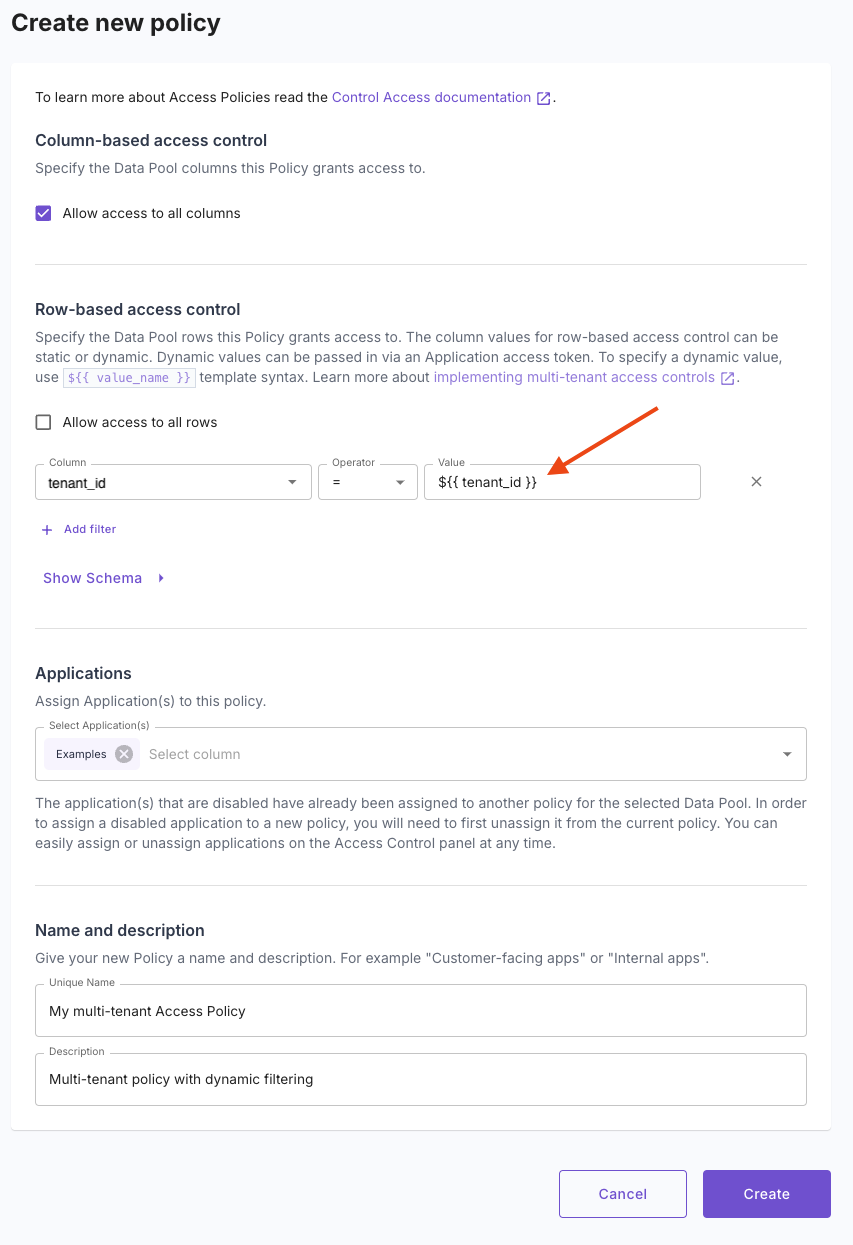
Instead of creating a separate policy for each tenant, define one policy with dynamic filtering:
 ```graphql theme={"system"}
mutation {
createDataPoolAccessPolicy(input: {
uniqueName: "My multi-tenant Access Policy",
description: "Multi-tenant policy with dynamic filtering",
dataPool: "DPO00000000000000000000000000",
columns: ["*"],
filterSql: "tenant_id = ${{ tenant_id }}"
}) {
dataPoolAccessPolicy {
dataPool {
id
}
id
uniqueName
}
}
}
```
```hcl theme={"system"}
resource "propel_data_pool_access_policy" "multi-tenant-policy" {
unique_name = "My multi-tenant Access Policy"
description = "Multi-tenant policy with dynamic filtering"
data_pool = "DPO00000000000000000000000000"
columns = ["*"]
row {
column = "tenant_id"
operator = "EQUALS"
value = "${{ tenant_id }}"
}
applications = ["APP00000000000000000000000000"]
}
```
\--
This policy uses `${{ tenant_id }}` as a placeholder, which will be filled with the actual tenant ID at runtime.
When a user logs in, mint a JWT token that includes their tenant ID:
```bash theme={"system"}
curl https://auth.propeldata.com/oauth2/token \
-d grant_type=client_credentials \
-d client_id=$YOUR_APP_ID \
-d client_secret=$YOUR_APP_SECRET \
-d 'policy_values={"tenant_id":"123"}'
```
When querying Propel's API, include this token in the Authorization header. Propel will automatically apply the correct tenant filter.
## Benefits
* **Scalability**: One policy serves all tenants.
* **Security**: Each tenant is strictly limited to their own data.
* **Flexibility**: Easily adapt to changes in your data model.
* **Multiple levels of tenancy**: This models supports multiple levels of tenancy (e.g. Organizations, customers, workspaces and users).
## Important Notes
* Always create tokens server-side for security.
* The resulting token is safe to use in frontend code.
* You can include multiple tenant-specific values in the token if needed.
By following this approach, you can efficiently secure your multi-tenant application, ensuring that each customer only accesses their own data while minimizing the overhead of policy management.
```graphql theme={"system"}
mutation {
createDataPoolAccessPolicy(input: {
uniqueName: "My multi-tenant Access Policy",
description: "Multi-tenant policy with dynamic filtering",
dataPool: "DPO00000000000000000000000000",
columns: ["*"],
filterSql: "tenant_id = ${{ tenant_id }}"
}) {
dataPoolAccessPolicy {
dataPool {
id
}
id
uniqueName
}
}
}
```
```hcl theme={"system"}
resource "propel_data_pool_access_policy" "multi-tenant-policy" {
unique_name = "My multi-tenant Access Policy"
description = "Multi-tenant policy with dynamic filtering"
data_pool = "DPO00000000000000000000000000"
columns = ["*"]
row {
column = "tenant_id"
operator = "EQUALS"
value = "${{ tenant_id }}"
}
applications = ["APP00000000000000000000000000"]
}
```
\--
This policy uses `${{ tenant_id }}` as a placeholder, which will be filled with the actual tenant ID at runtime.
When a user logs in, mint a JWT token that includes their tenant ID:
```bash theme={"system"}
curl https://auth.propeldata.com/oauth2/token \
-d grant_type=client_credentials \
-d client_id=$YOUR_APP_ID \
-d client_secret=$YOUR_APP_SECRET \
-d 'policy_values={"tenant_id":"123"}'
```
When querying Propel's API, include this token in the Authorization header. Propel will automatically apply the correct tenant filter.
## Benefits
* **Scalability**: One policy serves all tenants.
* **Security**: Each tenant is strictly limited to their own data.
* **Flexibility**: Easily adapt to changes in your data model.
* **Multiple levels of tenancy**: This models supports multiple levels of tenancy (e.g. Organizations, customers, workspaces and users).
## Important Notes
* Always create tokens server-side for security.
* The resulting token is safe to use in frontend code.
* You can include multiple tenant-specific values in the token if needed.
By following this approach, you can efficiently secure your multi-tenant application, ensuring that each customer only accesses their own data while minimizing the overhead of policy management.