> ## Documentation Index
> Fetch the complete documentation index at: https://www.propeldata.com/llms.txt
> Use this file to discover all available pages before exploring further.
# Querying JSON data
> Learn how to query JSON data.
Query JSON data using dot and bracket notation to access nested fields.
## Example JSON
Let's suppose you have a JSON column `payload` structured like this:
```json theme={"system"}
{
"customer_id": 5,
"order_id": 34,
"store_id": 4445,
"order_details": {
"taco_count": 5,
"total_price": 30.4,
"checkout_time": "2022-08-01T09:03:32Z"
},
"created_at": "2022-08-01T09:02:15Z"
}
```
You can reference the `taco_count` value inside the payload via the following syntax:
```
payload.order_details.taco_count
```
To filter on JSON columns in queries with pre-defined Metrics, first add them as dimensions to the Metric. For example, add `payload` as a dimension to filter on any of its fields.
## Querying JSON columns via the API
Use dot notation in API queries to reference specific JSON keys. Here's a TimeSeries query example with filtering:
```graphql theme={"system"}
query TimeSeriesExample1 {
timeSeries ({
...
filterSql: "payload.order_details.taco_count > 2"
...
}) {
values
}
}
```
The filter uses `payload.order_details.taco_count` to refer to the taco count key within `payload.order_details`.
## Using JSON in the console
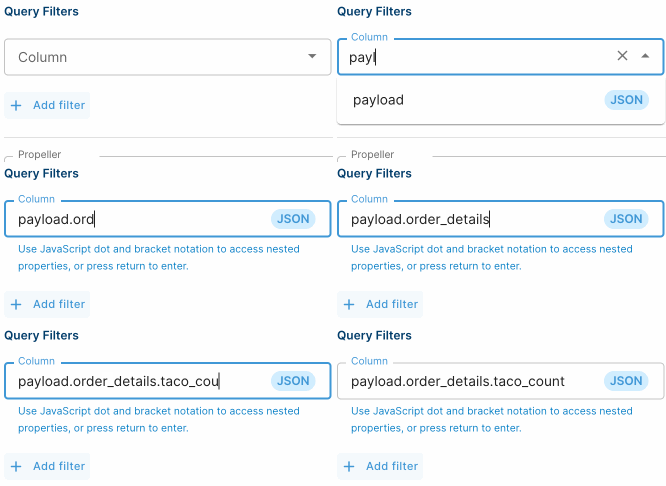 When creating a Metric in the Console, if a column is of type JSON, it will be clearly marked. If a JSON column is selected, the text field allows for JavaScript dot and bracket notation to be entered to reference nested values.
The JavaScript dot and bracket notation is validated to make sure the syntax is correct. It is **not** validated against the data stored in the JSON - this is because the reference can be created before the data exists.
## Property escaping
If you have a column named "foo.bar", then you cannot reference it using `foo.bar`, since this will be interpreted as JavaScript dot notation. Instead, you can use square brackets to escape the period, like this: `["foo.bar"]`.
When creating a Metric in the Console, if a column is of type JSON, it will be clearly marked. If a JSON column is selected, the text field allows for JavaScript dot and bracket notation to be entered to reference nested values.
The JavaScript dot and bracket notation is validated to make sure the syntax is correct. It is **not** validated against the data stored in the JSON - this is because the reference can be created before the data exists.
## Property escaping
If you have a column named "foo.bar", then you cannot reference it using `foo.bar`, since this will be interpreted as JavaScript dot notation. Instead, you can use square brackets to escape the period, like this: `["foo.bar"]`.